Class 6 · Unit 0: Getting to know the laptop · Lesson 0.1 · 40 min
Meet the laptop
Sana pressed every key. Nothing happened. Then her uncle showed her one small button — and the screen lit up.
Today you will: Name every part of the laptop · Switch it on the right way · Shut it down safely, in five steps
Story
Sana's uncle came home from Srinagar with an old laptop. "It's like a phone," said Sana, "but it opens like a book!"
She pressed every key to see what would happen. Nothing happened. Then her uncle showed her one small button. The screen lit up.
Uncle: “Every part has a job. Let's meet them one by one.”
Watch
Meet the laptop, — scan code 6.0.1 in the printed book.
Warm up your fingers
Not today. Today we only find the keys. Look at the keyboard and find: Space bar, Enter, Backspace, Shift, and the two keys with small bumps (F and J).
On the laptop
Mission 1: Switch on (pairs, 6 min)
- ☐1
Carry the laptop with two hands. Put it flat on the desk and open the lid slowly.
- ☐2
Predict: how long will the screen take to light up — 1 second, 10 seconds, or a minute?
- ☐3
Press the power button once. Wait. Don't press it again. Your teacher types the password.
Mission 2: Meet the parts (pairs, 6 min)
- ☐4
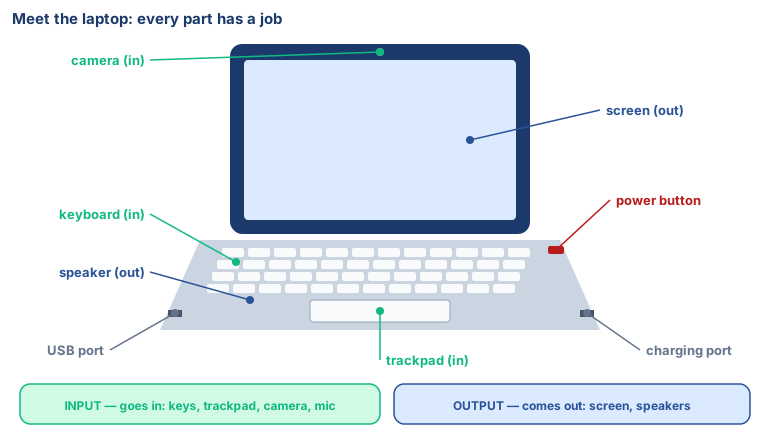
Point to each part and say its name to your partner: screen, keyboard, trackpad, camera, speaker, USB port, charging port.
- ☐5
Press Caps Lock. Does a light come on? Press it again to switch it off.
Mission 3: Shut down safely (pairs, 6 min)
- ☐6
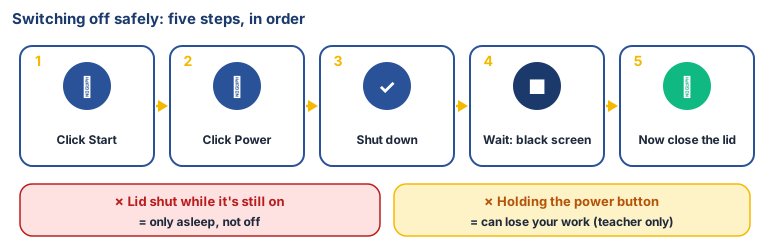
Click Start → Power → Shut down.
- ☐7
Wait for a completely black screen. Then close the lid.
- ☐8
Swap roles and do steps 3 and 6–7 again.
No laptop today?
Cut out the paper laptop sheet your teacher gives you, fold it and label each part. Your partner presses the drawn power button — you say what happens next.
Now you know
- Input devices put things in: keyboard, trackpad, camera, microphone.
- Output devices bring things out: screen, speakers.
- The power button switches it on. Shut down from the Start menu to switch it off.
- Holding the power button to force it off can lose your work — only if a teacher says so.
- Look after it: two hands, no food, no water, gentle with the charger.
Debate it
Many people in your family share one phone. Your school's laptops are shared too. What rules would help everyone look after something that belongs to all of us?
Check yourself — practice, not a test
1. Match each part to its job:
Keyboard · Screen · Speaker · Camera
Match with: shows pictures and words (output) · types letters (input) · takes pictures (input) · plays sound (output)2. The safe way to switch off a laptop is to close the lid while it is still on.
- ○ True
- ○ False
3. Put these in order to shut down:
- 1. Click Start
- 2. Wait for a black screen
- 3. Click Power
- 4. Close the lid
- 5. Click Shut down
4. Which key has a small bump on it?
- ○ Enter
- ○ F
- ○ Space
- ○ Q
Remember
Every part has a job. Shut down from the Start menu, then close the lid.