Class 6 · Unit 0: Getting to know the laptop · Lesson 0.3 · 40 min
Files and folders
"If I threw everything in one pile, I'd never find your birth certificate." A laptop needs shelves too.
Today you will: Make your own folder — no name on it · Save a file exactly where you want it · Find it again in a treasure hunt
Story
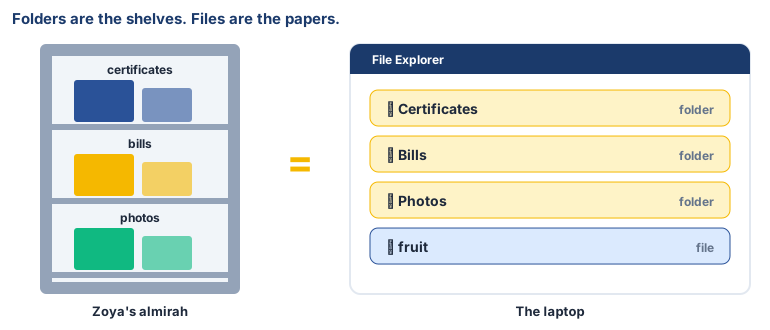
Zoya's mother keeps papers in a steel almirah: school certificates on the top shelf, electricity bills in a blue folder, and photos in a box.
Mother: “If I threw everything in one pile. I would never find your birth certificate.”
A laptop is the same. Folders are the shelves. Files are the papers.
Watch
Files and folders, — scan code 6.0.3 in the printed book.
Warm up your fingers
Fingers on F and J. Now place the rest: A S D F on the left, J K L ; on the right.
Type asdf jkl; slowly, 5 times. Look at the screen, not your fingers.
On the laptop
Mission 1: Your folder (alone or pairs, 5 min)
- ☐1
Open File Explorer (the yellow folder icon), then Documents.
- ☐2
Right-click the empty space → New → Folder. Name it with your class and roll number, like 6A-Roll12, and press Enter. No real name — your roll number is enough.
Mission 2: Save a file (7 min)
- ☐3
Open Notepad (Start → type Notepad → Enter) and type:
My favourite fruit is… and your fruit. - ☐4
File → Save as. Go to Documents → 6A-Roll12, name it fruit, click Save. Close Notepad.
Mission 3: Treasure hunt (5 min)
- ☐5
Predict: how many clicks to find your file again? Find it and double-click — is your sentence there?
- ☐6
In your folder, make one more: AI-work. All your work this year goes there.
No laptop today?
Fold an A4 sheet into a folder and write 6A-Roll12 on it. Put three paper "files" inside — a drawing, a list and a sentence — each with a clear name. Swap with a partner: can they find your "fruit" file in 10 seconds?
Now you know
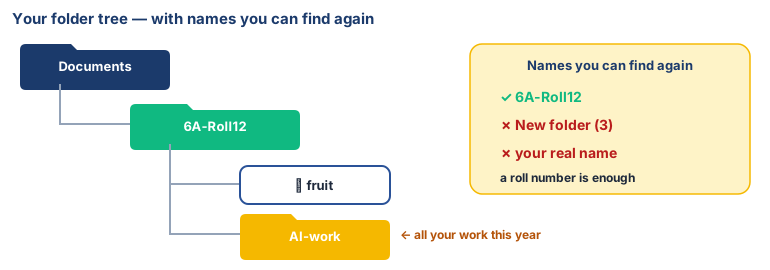
- A file holds one piece of work. A folder holds files and other folders.
- Clear names make things easy to find: 6A-Roll12, not New folder (3).
- Save as lets you choose where a file goes and what it's called.
- Organised data helps computers — and AI — work better.
Debate it
Your folder is named with a roll number, not your name. Why might that be a good idea on a laptop that the whole school shares?
Check yourself — practice, not a test
1. Which is the best name for a folder?
- ○ New folder (3)
- ○ 6A-Roll12
- ○ asdfgh
- ○ stuff
2. A ______ can hold files and other folders.
3. Saving a file: (put in order)
- 1. Click File
- 2. Click Save as
- 3. Type a name
- 4. Click Save
- 5. Choose the folder
4. When you close Notepad, a file you saved is lost.
- ○ True
- ○ False
Remember
Folders are shelves, files are papers, and good names help you find them.