Class 6 · Unit 0: Getting to know the laptop · Lesson 0.5 · 40 min
My first typing class
Faisal's login card had a username and a hidden password — but not his name. "Where's my name?" Somewhere safer.
Today you will: Log in to typing.com with your card · Finish your first two typing screens · Log out so nobody else can use your account
Story
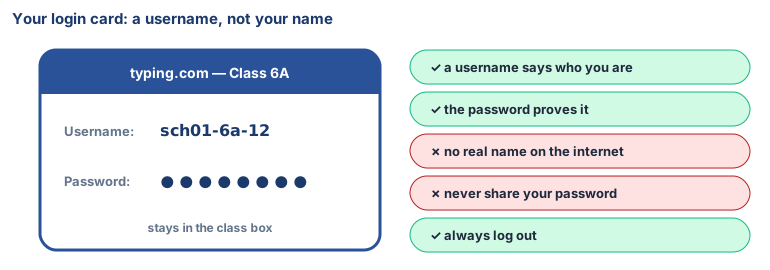
Faisal got a small card from his teacher. It said Username: sch01-6a-12 and Password: ********.
Faisal: “Where's my name?”
Teacher: “Not on the internet. The website only needs to know your username. Your name stays safe with us.”
Watch
Your first typing.com class, — scan code 6.0.5 in the printed book.
Warm up your fingers
Before logging in: in Notepad, type asdf jkl; 5 times without looking at your hands.
On the laptop
Mission 1: Log in (alone, 5 min)
- ☐1
Take your login card from the class box. Show it to nobody but your teacher.
- ☐2
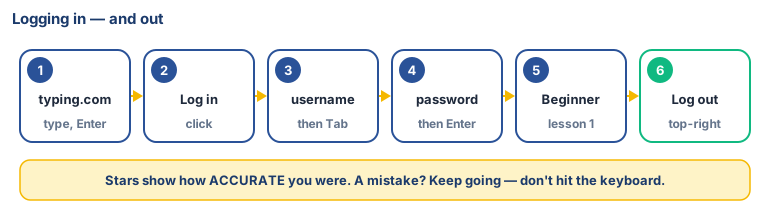
Open the browser, click the address bar, type
typing.com, press Enter. - ☐3
Click Log in. Type your username, press Tab, type your password (it shows as dots), press Enter.
Mission 2: Your first lesson (alone, 10 min)
- ☐4
Predict: how many stars will you get on your first screen?
- ☐5
Open the first Beginner lesson and type the letters, fingers on the home row. A mistake? Keep going. Finish at least 2 screens.
Mission 3: Log out (2 min)
- ☐6
Your username (top-right) → Log out. Put your card back in the box.
No laptop today?
Your teacher reads the first lesson's letters (f j f j fj jf) aloud and you "type" them on the paper
keyboard. Then write your username on your card from memory.
No internet today?
Open Tux Typing or Klavaro on the laptop, if your school has installed one, and do the home-row lesson.
Now you know
- A username says who you are to a website. A password proves it.
- No real name goes in your username. That keeps you safe.
- Never share your password except with your teacher.
- Always log out on a shared laptop, or the next person can use your account.
- Accuracy first on typing.com. Speed grows by itself.
Debate it
Faisal's friend asks, "What's your password? I'll do your typing lesson for you!" What should Faisal say, and why?
Check yourself — practice, not a test
1. It is fine to tell your best friend your password.
- ○ True
- ○ False
2. Why does your username not have your real name in it?
- ○ Names are too long to type
- ○ To keep your personal information private
- ○ The website does not allow names
- ○ It is a mistake
3. Logging in: (put in order)
- 1. Open the browser
- 2. Type typing.com
- 3. Press Enter
- 4. Click Log in
- 5. Type username and password
4. What should you do when you finish on a shared laptop?
- ○ Close the lid
- ○ Log out
- ○ Leave it for the next person
- ○ Turn off the screen brightness
Remember
Username, not my name. Password, not shared. Log out every time.