Class 6 · Unit 2: Data · Lesson 2.2 · 40 min
Rows and columns: organising data in a table
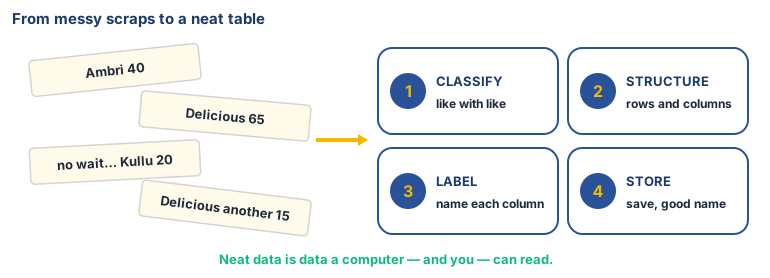
Scraps of paper all day at the mandi: Ambri 40, Delicious 65, no wait… In the evening nobody can say how many Delicious boxes were sold.
Today you will: Build your first spreadsheet table · Make the computer add up for you · Read an answer straight from a table
Story
At the Sopore fruit mandi, Zubair's father writes on scraps of paper all day: "Ambri 40... Delicious 65... no wait, Kullu 20... Delicious another 15..."
In the evening he asks, "How many Delicious boxes did we sell?" Nobody can find all the scraps.
Zubair takes a notebook and draws lines. One column for the variety, one for boxes, one for the price. Now each sale is one neat row.
Zubair: “Now even a computer could read this.”
Watch
Rows, columns and your first spreadsheet — — scan code 6.2.2 in the printed book.
Warm up your fingers
10 minutes on typing.com: top row practice.
- Start the top-row lessons (for example "Top Row: E and I").
- Also practise the Tab and Enter keys, which you will use in the spreadsheet today.
- Goal: go back to the home row after every reach.
On the laptop
Tools: LibreOffice Calc
Mission 1: Type the table (alone or pairs, 9 min)
- ☐1
Open Calc. In A1 type
Variety, press Tab, typeBoxes, Tab,Price per box (Rs), then Enter. - ☐2
Type these rows — Tab between cells, Enter at the end of each row: Delicious 65 1100 · Ambri 40 1400 · Kullu Delicious 20 900 · American 30 1000 · Maharaji 15 1200 (Prices made up for practice — real mandi prices change every day.)
- ☐3
Make row 1 bold: select it and press Ctrl + B. Double-click the line between column letters to widen a column.
Mission 2: Let the computer add (alone or pairs, 8 min)
- ☐4
Predict: how many boxes were sold altogether? Write your guess down.
- ☐5
Click an empty cell, type
=SUM(B2:B6)and press Enter. Was your guess close? - ☐6
Answer from your table: which variety sold most? which is most expensive?
- ☐7
Save as
mandi.odsin yourmy-data-6folder.
Finished early?
Add a Total (Rs) column: in D2 type =B2*C2 and fill it down. Which variety brought in the
most money?
No laptop today?
Rule a table with three columns in your notebook: Favourite fruit · Favourite season · How you come to school. Fill one row each for 5 classmates — no names. Then answer: which fruit is most popular?
Now you know
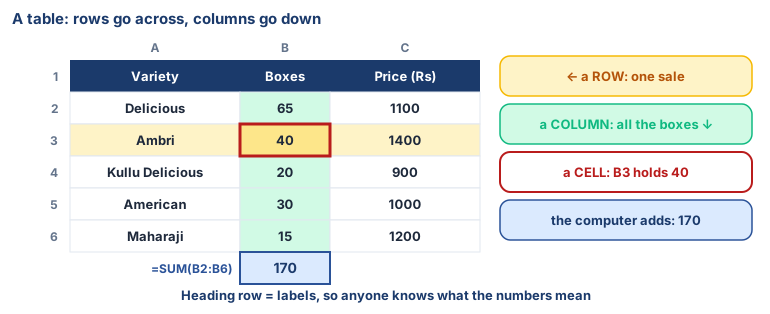
- A table puts data into rows (across) and columns (down).
- The heading row tells us what each column means.
- Every box is a cell with an address, like B3.
- One row is one example one sale, one day, one answer.
- Four steps organise data: classify (like with like), structure (rows and columns), label (name each column), store (save it with a good name).
- A chart is the same data drawn as a picture — that's next lesson.
- Neat tables help AI find patterns much more easily than messy notes.
🕌 From our heritage
A thousand years ago the scholar al-Bīrūnī (973–1048) filled his books with tables: distances between cities, positions of stars, weights of metals. He did not trust a single measurement — he compared his figures with other scholars' and looked for the mistakes. Using careful measurements and mathematics, he worked out the size of the Earth and came remarkably close to the figure we use today. Neat tables and cross-checked numbers are older than any computer.
Al-Bīrūnī, Kitāb Taḥdīd Nihāyāt al-Amākin (c. 1025) and al-Qānūn al-Masʿūdī.
Debate it
Zubair's father wrote the scraps quickly because he was busy. When is it worth taking extra time to organise data neatly?
Check yourself — practice, not a test
1. In a spreadsheet, rows go:
- ○ Across, from left to right
- ○ Down, from top to bottom
- ○ Diagonally
- ○ Only on the first page
2. The box where a row and a column meet is called a ______.
3. The top row of a table usually holds headings.
- ○ True
- ○ False
4. Put the steps in order to start a table:
- 1. Type one example in each row
- 2. Open LibreOffice Calc
- 3. Save the file
- 4. Type the headings in row 1
5. Match each step of organising data to what you did today:
Classification · Structuring · Labelling · Storage
Match with: Put all the apple sales together in one table · Saved the file as mandi.ods in your folder · Arranged them in rows and columns · Typed a heading above each column
Remember
Rows go across, columns go down, and every row is one example.