Class 6 · Unit 2: Data · Lesson 2.4 · 40 min
Our class dataset: asking good questions
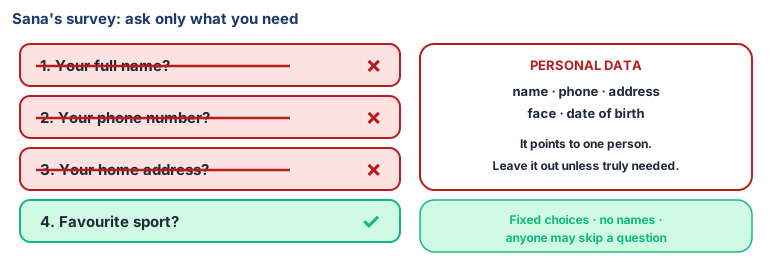
Sana's sports survey asks for your full name, your phone number and your home address. "Why do you need my phone number to know I like cricket?"
Today you will: Write survey questions with no personal data · Build a real class dataset · Sort and filter it to find answers
Story
Sana wants to find out what sports her class likes. She writes a survey:
- Your full name?
- Your phone number?
- Your home address?
- Favourite sport?
Her friend Imran reads it and frowns. "Why do you need my phone number to know I like cricket?"
Sana looks again. She only needs question 4. The other questions collect things about people that she has no reason to know.
Watch
Collecting data the right way — — scan code 6.2.4 in the printed book.
Warm up your fingers
10 minutes on typing.com: bottom row introduction.
- Start the bottom-row lessons (for example "Bottom Row: M and V").
- Practise the comma and full stop, which you need for typing answers.
On the laptop
Tools: paper slips · LibreOffice Calc
Mission 1: Ask good questions (whole class, 8 min)
- ☐1
As a class, agree 4 questions with fixed answer choices and no personal data — for example favourite sport · how you come to school · favourite season · hours of sleep last night.
- ☐2
Everyone answers on a slip with no name. The teacher collects and shuffles the slips.
Mission 2: Type the dataset (groups, 7 min)
- ☐3
In Calc, row 1:
Response · Sport · Travel · Season · Sleep. - ☐4
Type one slip per row, numbering the rows
1, 2, 3…inResponse. Never type a name. - ☐5
Read each row aloud while a partner checks the slip. The teacher joins the groups' rows into one class file — save your copy as
class-survey.ods.
Mission 3: Sort and filter (groups, 5 min)
- ☐6
Predict: which sport will win? Write it down.
- ☐7
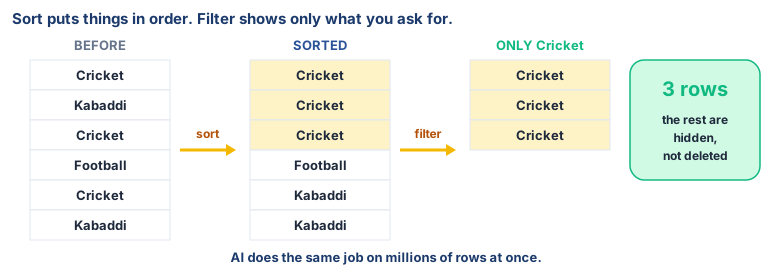
Sort: click in
Sport, Data → Sort → Sort Ascending. The same answers now sit together. - ☐8
Filter: Data → AutoFilter, click the arrow on
Sport, tick only Cricket. How many rows are left? Show all rows again — then make a bar chart for one question, like Lesson 3.
No laptop today?
Run the same survey on paper. Collect the no-name slips, make a tally table on the board together, and draw a pictogram for one question.
Now you know
- A dataset is a collection of data about one topic.
- Today's data came from people , by asking. It can also come from books and records, the internet, and instruments.
- Sorting puts rows in order so the same answers sit together. Filtering hides every row except the ones you asked for.
- Ask only what you need. Fewer questions means less that can go wrong or leak.
- Personal data name, phone, address, face, date of birth — points to one person. Leave it out unless truly needed.
- Ask permission , and let people skip a question.
- Fixed answer choices make data neat and easy to count.
Debate it
A free game app asks for your photo, your school name and your location "to make the game better". Is that fair? What would you do?
Check yourself — practice, not a test
1. Which are personal data? (choose all that apply)
- ○ Your phone number
- ○ Your favourite season
- ○ Your home address
- ○ A photo of your face
2. A good survey asks as many questions as possible, just in case.
- ○ True
- ○ False
3. Why do we give fixed answer choices like "Walk / Bus / Car"?
- ○ To make the survey longer
- ○ So the answers are neat and easy to count
- ○ So people can't choose
- ○ Because computers can't read words
4. Before collecting someone's data, you should ask for their ______.
5. You want to see only the rows where the answer is "Bus". This is called:
- ○ Sorting
- ○ Filtering
- ○ Labelling
- ○ Charting
6. Match each source of data to an example:
People · Books and records · Internet · Instruments
Match with: Asking classmates how they travel to school · A thermometer reading taken at 9 a.m. · The school attendance register · A weather website's rainfall figures
Remember
Collect only what you need, ask permission, and keep names out.