Class 6 · Unit 4: Ethics and digital responsibility · Lesson 4.1 · 40 min
Digital footprints
Fox prints in the Gulmarg snow show where it went, where it stopped, where it turned. Your clicks leave prints too — and they don't melt.
Today you will: Find the footprints a browser keeps · Sort them: active or passive · Clean them — and learn what cleaning can't do
Story
It snowed all night in Gulmarg. In the morning, Bilal runs outside and stops. There are small footprints in the snow, going from the gate to the shed.
Hiba: “A fox! Look, you can see where it went, where it stopped, and where it turned back.”
Bilal looks at his own boots. Behind him is a long line of prints, from the door all the way to where he is standing. "So anyone can see where I went too?"
Hiba: “In the snow, yes. On the internet, also yes. And those footprints don't melt.”
Today you will find the footprints you leave on a computer, and learn how to clean some of them.
Watch
Footprints that don't melt — — scan code 6.4.1 in the printed book.
Warm up your fingers
Skill: top row, E and I (7 min)
- On typing.com, open Beginner → "Top Row: E and I".
- Keep your fingers anchored on F and J. Reach up to E and I, then come back home.
- Type slowly and evenly. A steady rhythm beats fast bursts.
On the laptop
Tools: a web browser · a new text document
Mission 1: Leave some footprints (pairs, 5 min)
- ☐1
Open the browser (Chrome, Edge or Firefox).
- ☐2
Visit the three pages your teacher writes on the board — say, Srinagar weather, the chinar tree, and apples.
- ☐3
Press Ctrl + H to open your History. How many pages are listed? What times?
Mission 2: Footprint detectives (pairs, 6 min)
- ☐4
Predict: how many footprints will you find on this laptop — 3, 10, or more? Write your guess.
- ☐5
Click the padlock or settings icon left of the web address. Find Cookies or Site data — small notes a website saves to remember you.
- ☐6
In your document, fill this table:
Footprint Where I found it Who can see it? Pages I visited History (Ctrl + H) Cookies Padlock / settings icon Search words
Mission 3: Clean up (pairs, 4 min)
- ☐7
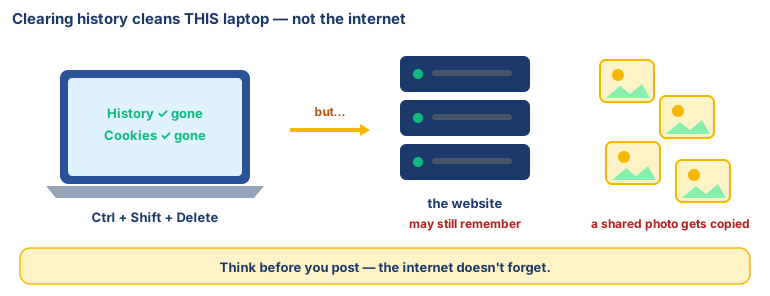
Press Ctrl + Shift + Delete. Choose Last hour, tick Browsing history and Cookies, click Clear.
- ☐8
Press Ctrl + H again. What changed? Then talk: the websites may still remember you came.
No laptop today?
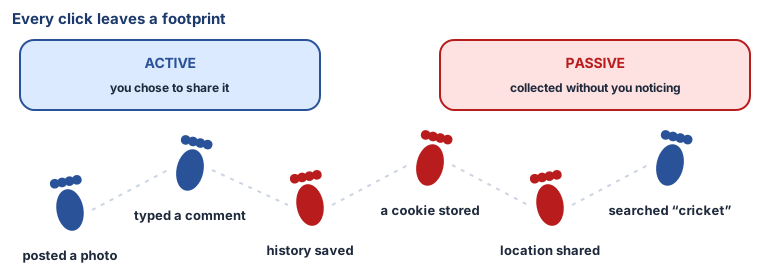
Draw a footprint path across your page. On each print, write one thing you did online this week — searched "cricket score", watched a cartoon. Colour active prints blue and passive ones red. Swap: what could a stranger guess about you?
Now you know
- Ethics means knowing right from wrong and choosing right. Computer ethics is that, for computers, phones and the internet.
- A digital citizen uses technology safely, honestly and kindly — like a good neighbour on a shared street.
- A digital footprint is the trail you leave when you use the internet.
- Active footprints are what you choose to share. Passive footprints are collected without you noticing — history, cookies, location.
- Clearing the laptop doesn't clear the internet. A shared post or photo can be copied and kept forever.
- AI apps use your footprints to guess what you like. Useful — and a reason to think before you click.
🕌 From our heritage
Long before the internet, our scholars treated other people's private affairs as something you do not go looking for. The Qur'ān tells believers not to spy on one another (Al-Hujurat 49:12), and the Prophet ﷺ said that whoever screens a Muslim, Allah will screen him on the Day of Resurrection (Ṣaḥīḥ al-Bukhārī 2442). Someone else's digital footprint — a sister's messages, a friend's history — is their private trail. Walking through it uninvited is the same old idea in a new place.
Sources: Qur'ān 49:12; Ṣaḥīḥ al-Bukhārī, Book of Oppressions (al-Maẓālim), hadith 2442 (also Ṣaḥīḥ Muslim 2580).
Debate it
A game app suggests exactly the kind of games you like, because it has been watching what you play.
Is that helpful, or is it creepy? Where would you draw the line? Give one reason.
Check yourself — practice, not a test
1. Which of these is a passive footprint?
- ○ A comment you wrote on a video
- ○ A photo you posted
- ○ A list of websites your browser saved without asking
- ○ A message you sent to your cousin
2. When you clear your browser history, every website you visited forgets you completely.
- ○ True
- ○ False
3. Match each keyboard shortcut to what it does.
Ctrl + H · Ctrl + Shift + Delete
Match with: Opens "clear browsing data" · Opens browsing history4. Which are good habits for a smaller footprint? (choose all that apply)
- ○ Think before you post
- ○ Share your location with every app
- ○ Clear history on a shared laptop
- ○ Ask an adult before signing up for anything
5. Knowing right from wrong and choosing right, when using computers and the internet, is called ______ ethics.
Remember
Everything you do online leaves a footprint. Choose where you walk.