Class 6 · Unit 4: Ethics and digital responsibility · Lesson 4.3 · 40 min
Passwords and 2-step login
Uncle's shop page is full of posts he never wrote. His password was a walnut and three numbers. A computer guessed it before breakfast.
Today you will: Build a strong passphrase with dice · See why length beats tricks · Leave a shared laptop safely
Story
Bilal's uncle runs a small dry-fruit shop in Lal Chowk, and he has just started selling online. One morning his shop page is full of strange posts he never wrote.
Uncle: “Someone guessed my password.” (quietly.)
Hiba: “What was it?”
He looks embarrassed. "walnut123."
Hiba doesn't laugh. She says: "Uncle, a computer can try thousands of guesses every second. It tried walnut before breakfast."
Today you will learn to make a password a computer can't guess, and to add a second lock.
Watch
Locks, keys and passphrases — — scan code 6.4.3 in the printed book.
Warm up your fingers
Skill: top row, T and Y, plus the hyphen (6 min)
- On typing.com, open Beginner → "Top Row: T and Y".
- Then practise the hyphen (-) key with your right little finger. You will need it for passphrases today.
- A passphrase is a typing test in disguise. The better you type, the longer the passphrase you can comfortably use.
On the laptop
Tools: a new text document · a die or spinner (your teacher's)
Safety rule: everything today is practice. Never type a real password — yours, a parent's, anyone's — into any website, including "password checkers".
Mission 1: The passphrase machine (alone, then pairs, 12 min)
- ☐1
New document, title "Passphrase machine".
- ☐2
Word bank: type 12 ordinary words, one per line — things, animals, places, actions.
- ☐3
Roll the dice: your teacher rolls; take the word on that line. Do it four times. Chance picks better than you do.
- ☐4
Join the four words with hyphens: word-word-word-word.
- ☐5
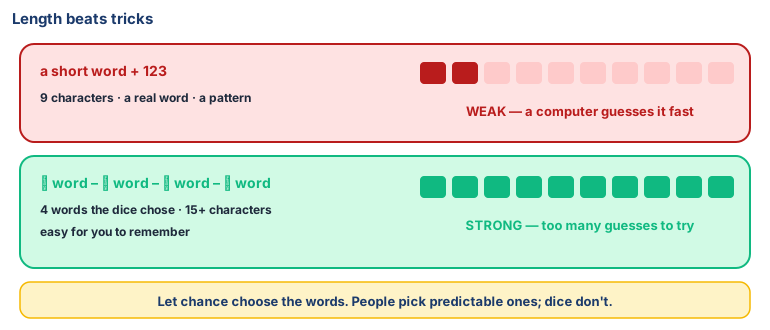
Predict: will it be longer or shorter than a short word with 123 (9 characters)? Then count its characters.
- ☐6
Score it — 1 point each: 15+ characters · 4+ words that don't go together · no name, birthday or phone number · not a famous phrase or song line · not used anywhere else. 5 out of 5 is strong.
- ☐7
Pair check: swap word banks (not passphrases). Could your partner guess your four?
- ☐8
Delete the practice passphrase. It must never become a real password.
Mission 2: Leaving a shared laptop safely (pairs, 5 min)
- ☐9
Find log out or sign out on this laptop and browser. Closing the lid leaves you signed in.
- ☐10
Find the antivirus — usually a shield near the clock. Is it on? When did it last check?
- ☐11
Write the three things to do before leaving an internet-café computer: log out · clear history · take your USB drive.
Teacher demo (projector only): 2-step login. The teacher shows, on their own account, what a 2-step code looks like. Students watch — no accounts are set up.
No laptop today?
Do steps 2–6 on paper with a real die. Draw two locks on a door — "something I know" and "something I have" — with an example under each. List what to do before leaving a shared computer.
Now you know
- Computers crack passwords by guessing fast common words, names and patterns like 123 first.
- Length beats tricks. Four random words (a passphrase) beat a short word with symbols, and are easier to remember.
- Let chance choose. People pick predictable words; dice don't.
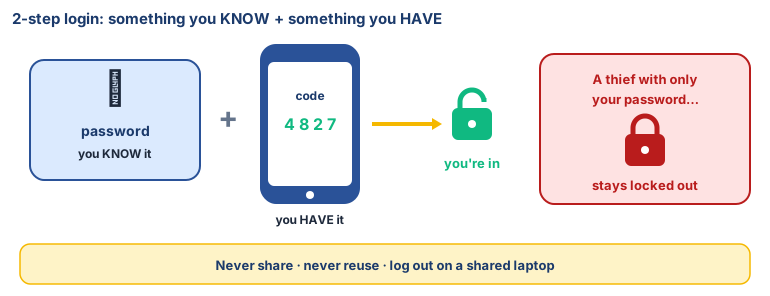
- 2-step login needs something you know plus something you have. A stolen password alone isn't enough.
- Golden rules: never share, never reuse, never type it into a site you don't trust.
- Log out before leaving a shared computer — closing the lid isn't logging out.
- Antivirus hunts harmful programs; a firewall decides what goes in and out. Keep both on.
- Public Wi-Fi: assume someone may be listening. Read the news; don't log in.
🕌 From our heritage
Something placed in your care is an amānah, a trust. The Qur'ān says: "Do not betray your trusts knowingly" (Al-Anfal 8:27), and the Prophet ﷺ named betraying a trust as one of the three signs of a hypocrite (Ṣaḥīḥ al-Bukhārī 33). Your password is an amānah. So is the school laptop you were handed this morning, and so is the data your classmates gave you for the class project. Keeping them safe is not only a computer rule.
Sources: Qur'ān 8:27, translation by Dr. Mustafa Khattab, The Clear Quran; Ṣaḥīḥ al-Bukhārī, Book of Belief (al-Īmān), hadith 33.
Debate it
Your best friend says: "We're best friends. Tell me your password, and I'll tell you mine."
How do you say no without hurting the friendship? Write the exact words you would use.
Check yourself — practice, not a test
1. Which password is the strongest?
- ○ walnut123
- ○ Bilal2014
- ○ W@lnut!
- ○ Four words the dice chose, joined with hyphens
2. It is safe to test your real password on a website that says it will "check how strong it is".
- ○ True
- ○ False
3. Put the passphrase method in order:
- 1. Roll the die to pick words
- 2. Check it against the strength rules
- 3. Make a word bank
- 4. Join the words with hyphens
4. Match each item to its type in 2-step login:
Your password · A code sent to a parent's phone
Match with: Something you have · Something you know5. Which are golden rules for passwords? (choose all that apply)
- ○ Never share it
- ○ Use the same one everywhere so you don't forget
- ○ Never reuse it
- ○ Write it on the laptop screen
6. You finish your work on a shared lab laptop. What should you do first?
- ○ Close the lid and walk away
- ○ Log out of your account
- ○ Turn the screen brightness down
- ○ Delete someone else's files
Remember
Long and random beats short and clever. Add a second lock.