Class 6 · Unit 5: Computational thinking · Lesson 5.4 · 40 min
If this, then that
Snowing? Pheran and gumboots. Road closed? Bus at the main stop. Otherwise, walk. Nasir's mother never repeats herself — she gave him rules.
Today you will: Turn everyday rules into if-then · Build a Scratch maze that reacts to walls · Find out what a program really "sees"
Story
Every morning, Nasir's mother says the same thing:
If it is snowing, then wear your pheran and gumboots. If the road is closed, then wait for the school bus at the main stop. Otherwise, walk the usual way.
Nasir does not need a new instruction every day. His mother gave him rules with conditions, and he checks them himself each morning.
Computers work the same way. A program cannot "see" the weather, but it can check a condition, if this is true, then do that, and choose what to do next.
Watch
How programs make decisions — scan code 6.5.4 in the printed book.
Warm up your fingers
Practise the arrow keys and space bar. You will steer a sprite with them today.
- typing.com: Beginner → Space bar lessons, then free practice
- Then type this sentence twice, with no mistakes:
if it is snowing then wear boots
On the laptop
You need: Scratch Desktop (offline, no account) — or scratch.mit.edu without signing in
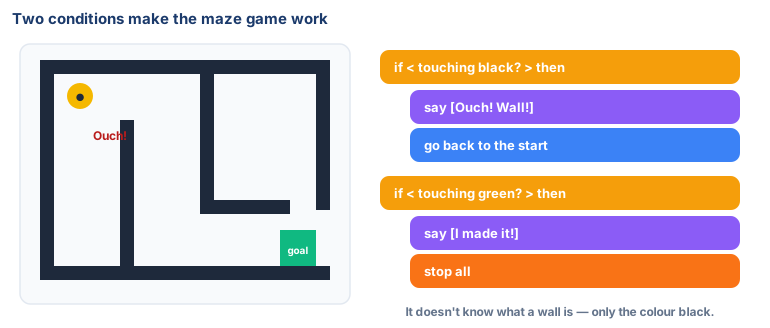
Mission 1: Maze and controls (pairs, 8 min)
- ☐1
Click the Stage, then Backdrops → Paint. Draw thick black walls and a small green goal box.
- ☐2
Pick a small sprite (set size 30). Add four scripts:
when [right arrow] key pressed → change x by 5, and the same for left (x by -5), up (y by 5) and down (y by -5).
Mission 2: Add the decisions (pairs, 10 min)
- ☐3
Under when green flag clicked:
go to x: (start x) y: (start y), then a forever loop holding two rules:if <touching color [black]?> then say [Ouch! Wall!] for 0.5 seconds go to x: (start x) y: (start y) if <touching color [green]?> then say [I made it!] stop [all]Use the eyedropper in the colour box to pick your exact colours.
- ☐4
Predict: what will happen when you steer into a wall on purpose? Then try it.
- ☐5
Play your partner's maze. Can you reach the goal?
Finished early?
Add an if-else: if the sprite touches blue water, it says Splash! and slows
down; else it moves normally.
No laptop today?
Draw a grid maze on paper. Your partner is the sprite and follows your rules out loud: "If the next square is a wall, then stay and say Ouch." Then draw your rules as a flowchart with diamond-shaped question boxes.
Now you know
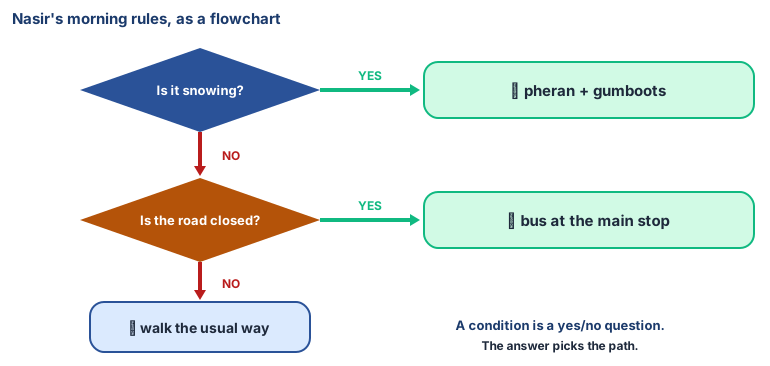
- A condition is a question with a true or false (yes or no) answer.
- If-then tells a program: do this only when the condition is true.
- If-then-else gives two paths: one for true, one for false.
- Conditions let a program decide without a person telling it each time.
- Decision trees are many if-then questions in a row — how many simple AI systems decide.
🕌 From our heritage
Remember al-Khwārizmī from Lesson 1.1? In Baghdad, around 825 CE, he wrote a book showing how to calculate with Indian numerals, step by careful step. Translated into Latin as Algoritmi de numero Indorum, his name became our word algorithm. (His other famous book, on al-jabr, gave us the word algebra.) The step-by-step rules you are building in Scratch today are that same idea, 1,200 years later.
Sources: al-Khwārizmī, Kitāb al-Ḥisāb al-Hindī, c. 825 CE, known in Latin as Algoritmi de numero Indorum; and Kitāb al-Mukhtaṣar fī Ḥisāb al-Jabr wa'l-Muqābala, c. 820 CE.
Debate it
A school gate machine lets a student in if they show an ID card. One day a child forgets their card. It is freezing outside and the machine says No. Should a machine's rule ever be broken? Who should be able to say "let them in anyway"?
Check yourself — practice, not a test
1. A condition in a program can only be true or false.
- ○ True
- ○ False
2. What does this rule do? if <touching color black?> then go to start
- ○ It paints the wall black
- ○ It sends the sprite back to the start when it touches a black wall
- ○ It stops the program forever
- ○ It moves the sprite 5 steps
3. Put these steps of a morning rule in order:
- 1. If yes, wear gumboots
- 2. Look outside
- 3. Check: is it snowing?
- 4. Walk to school
4. An if-then-______ block gives the program a second path for when the condition is false.
Remember
If this, then that: conditions let a program decide.