Class 7 · Unit 0: Refresher · Lesson 0.1 · 40 min
Back at the laptop
Four months away from the keyboard. Where was F? Where was J? Your fingers remember more than you think.
Today you will: Make your own folder — no name on it · Take a typing test and beat only yourself · Log out like a pro on a shared laptop
Story
After the long winter break, Hiba sits down at the lab laptop. Her fingers hover over the keyboard. Where was F? Where was J?
Then she feels the two small bumps, and her hands remember. "It's like riding a bicycle," she tells Bilal. "My fingers remember, even if my head forgot."
Bilal is less sure. He hasn't opened a laptop since November. Today, both of them get back up to speed.
Watch
Back at the laptop, — scan code 7.0.1 in the printed book.
Warm up your fingers
Home row only: A S D F J K L ;. Type slowly, without looking at your hands, and aim for no mistakes. Use typing.com's home-row review lesson. Speed does not matter today.
On the laptop
You need: File Manager · LibreOffice Calc · typing.com · your paper card
Mission 1: Your folder (alone or in pairs, 8 min)
- ☐1
Switch on and wait for your teacher to unlock the laptop.
- ☐2
In File Manager, open
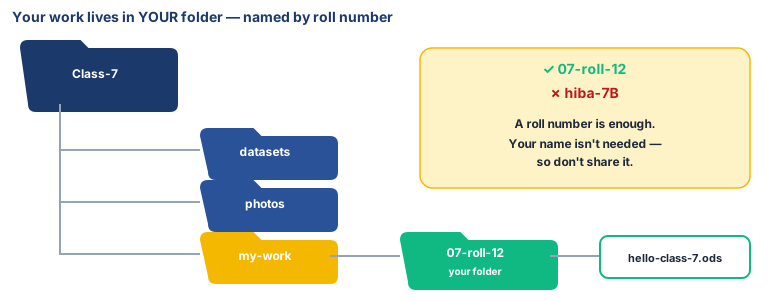
Class-7. Inside:datasets,photos,my-work. - ☐3
In
my-work, make a folder named with your roll number only, e.g.07-roll-12. No name — only share what's needed. - ☐4
Open Calc. Type
Class 7 starts!in A1 and today's date in A2. Save ashello-class-7.odsin your folder. Check it's there.
Mission 2: Your typing goal (alone, 10 min)
- ☐5
Predict: will your speed be higher or lower than your last Class 6 score? Write it on your card.
- ☐6
Open typing.com, log in with the username on your paper card, and take the 1-minute test . Write your WPM and accuracy next to your Class 6 score.
- ☐7
Set your goal: "By May, I want ___ WPM at ___% accuracy." It's compared only with your own last score.
- ☐8
Log out, close everything, shut down from the Start menu.
No laptop today?
Use the paper keyboard from your Class 6 book, or draw one. Eyes closed, fingers on the home row: a partner calls 10 letters for you to "press". Then write your Term 1 goal on your card.
Now you know
- Skills fade, and come back fast. A week of warm-ups is usually enough.
- One folder for you, a clear name for every file.
- No personal details in names. A roll number is enough.
- Your goal is your own a little above your last score, never compared with anyone.
- Log out on a shared laptop, every time.
Debate it
Hiba says her fingers "remember". A computer doesn't forget in the same way: it stores your file exactly. But can a computer learn a skill, the way your fingers did? Keep this question in mind. This year you will find out how machines learn from practice (data).
Check yourself — practice, not a test
1. Which folder name follows our privacy rule?
- ○ hiba-bhat-7B
- ○ 07-roll-12
- ○ my-house-near-dal
- ○ hiba-phone-9906...
2. Your typing goal should beat the fastest student in your class. (it should beat your own last score)
- ○ True
- ○ False
3. Put the steps in order:
- 1. Open Class-7
- 2. Open File Manager
- 3. Make your own folder
- 4. Open my-work
- 5. Save your file inside it
4. On a shared laptop, always ______ of a website before you leave.
Remember
Your own folder, your own goal, and always log out.