Class 7 · Unit 1: Three techniques · Lesson 1.3 · 40 min
Clustering: finding groups nobody labelled
A crate of mixed apples, labels lost. Nobody knows which is which. Hiba finds three groups anyway — and so can a machine.
Today you will: Spot groups in data with no labels · Colour the clusters on a chart · Name what each group means
Story
A new fruit shop opens near Lal Chowk. The owner, Mir Sahib, buys a big crate of mixed apples from three different orchards, but the labels have fallen off.
—: “I don't know which apple came from where. But my customers want sweet ones for eating and sour ones for cooking.” (he sighs.)
Hiba weighs a few apples and tastes some slices. "Look, the heavy ones are all quite sweet, and these little ones are really sweet. And these medium ones are sour!"
Nobody told Hiba the groups. She found them herself. Can a machine do that too?
Watch
Clustering, groups without labels — scan code 7.1.3 in the printed book.
Warm up your fingers
Skill: numbers + Tab (7 min)
- On typing.com, do a number row practice lesson.
- In Calc, practise moving along a row with Tab and down to a new row with Enter. Type
these three rows:
180 Tab 6 Enter·95 Tab 9 Enter·140 Tab 3 Enter
On the laptop
You need: LibreOffice Calc · fruit-cards-40.ods (40 apples: weight and sweetness, no labels)
Mission 1: See the clumps (pairs, 5 min)
- ☐1
Open
fruit-cards-40.ods. 40 rows — nothing tells you the group. - ☐2
Predict: how many groups are hiding in here? Write your guess in F1.
- ☐3
Select B1:C41, Insert → Chart… → XY (Scatter) → Points only → Finish. Count the clumps.
Mission 2: Mark them (pairs, 7 min)
- ☐4
Add a heading
Clusterin D1. Sort by Weight (Data → Sort) and find where the weight suddenly jumps. - ☐5
Give each apple a cluster number — 1, 2 or 3. Use the chart for the tricky ones.
- ☐6
Colour each cluster: select its rows, Format → Cells → Background.
Mission 3: Name them — the human part (pairs, 5 min)
- ☐7
For each cluster, find the average weight and sweetness, e.g.
=AVERAGE(B2:B14). - ☐8
Name each cluster in F2–F4: "big and sweet: eating apples"… Compare with the next pair. Same clusters? Same names?
No laptop today?
Pairs get 20 paper apple cards (weight and sweetness). Place them on a grid drawn on the desk, push close cards into piles, count the piles and name each one.
Now you know
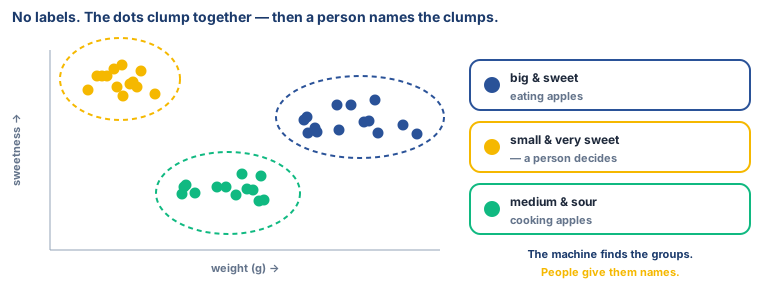
- Clustering groups items that are similar, with no labels given in advance.
- The machine compares features: which items are close together?
- A person names the groups what each cluster means, and what to call it.
- Classification uses labels. Clustering doesn't. That's the big difference.
- Use it when nobody knows the groups yet new songs, new shoppers, mixed-up apples.
Debate it
A shopping app clusters its customers and finds a group that "buys a lot at night". It starts showing that group extra advertisements after 10 pm.
Is that helpful, or is it using people's habits against them? Should children ever be put in clusters like this? (Hint: remember what India's DPDP Act says about tracking children.)
Check yourself — practice, not a test
1. Clustering needs labelled data before it can start.
- ○ True
- ○ False
2. Clustering is mainly used to:
- ○ Predict tomorrow's rainfall in millimetres
- ○ Group similar items together without labels
- ○ Check a password
- ○ Sort names in A–Z order
3. After the machine finds clusters, what does a person usually do?
- ○ Delete them
- ○ Look at each cluster and give it a meaningful name
- ○ Nothing, because the machine names them
- ○ Add labels to the training data first
4. Match each example to its technique:
Photo app groups pictures of the same person, with no names given · Mail app puts messages into spam or not spam · App predicts how many tourists will come in May
Match with: Clustering · Regression · Classification
Remember
Clustering = the machine finds the groups; people decide what the groups mean.