Class 7 · Unit 1: Three techniques · Lesson 1.4 · 40 min
Training and testing: keep some back
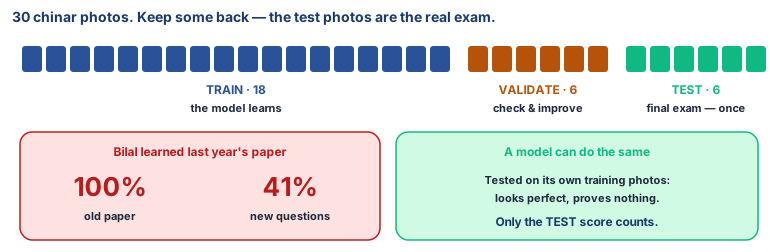
Bilal memorised last year's paper: 100% at home. New questions in the real exam: 41%. Machines make the very same mistake.
Today you will: Split data into train, validate and test · Train a real leaf model in Teachable Machine · Score it only on photos it has never seen
Story
Before the maths exam, Bilal found last year's paper and learned every answer by heart. In his practice at home he scored 100%.
Then the real exam came, and the questions were new. He scored 41%.
Hiba was kind about it. "You didn't learn maths, Bilal. You learned that paper."
Machines can make exactly the same mistake. That's why AI builders always keep some data hidden until the very end.
How do we know whether a model has really learned, or just memorised?
Watch
Training, validation, test — scan code 7.1.4 in the printed book.
Warm up your fingers
Skill: numbers and the % sign (7 min)
- On typing.com, practise the number row and symbols.
- Type these into Calc:
60%·20%·20%·=18/30·=6/30(The%sign is Shift + 5.)
On the laptop
You need: Teachable Machine in the browser (no account) · LibreOffice Calc · leaves/chinar/ and leaves/willow/ (30 photos each, already split: train 18 · validation 6 · test 6) · leaf-test.ods
Mission 1: Train (pairs, 6 min)
- ☐1
Teachable Machine → Get Started → Image Project → Standard image model. Rename the classes
ChinarandWillow. - ☐2
Upload the 18
trainphotos into each class. Click Train Model — don't switch tabs.
Mission 2: Check and improve (pairs, 5 min)
- ☐3
In Preview, switch Webcam to File. Try the 12
validationphotos. How many right? - ☐4
If several are wrong, add training photos or raise Epochs (under Advanced), and train again.
Mission 3: The final exam (pairs, 6 min)
- ☐5
Predict: what score will it get on photos it has never seen? Write it at the top of
leaf-test.ods. - ☐6
Try the 12
testphotos once each. Type the model's answer andYesorNofor right. - ☐7
Score:
=COUNTIF(C2:C13;"Yes")/12, as a percentage. That's your test accuracy. 🔒 Teachable Machine trains inside your browser. Don't click Export Model or save to Drive.
No laptop today?
The quiz-master game. Write 15 "What am I?" cards about leaves or fruit. Show a volunteer 9 cards (training), then 3 with feedback (validation), then 3 they've never seen (test). Which did they do best on? Why does that matter?
Now you know
- A dataset is the data that teaches and checks a model. Each item is a data point with features.
- Types: numerical · text · multimedia (images, audio, video) · time-series · spatial. By structure: structured, unstructured, hybrid.
- Split it three ways: training (learn) · validation (check and improve while training) · test (the final check, on data never seen).
- Memorised, not learned: great on training data, bad on new data.
- Only the test score tells you how it will do in the real world.
Debate it
A company says its apple-disease model is "99% accurate!" but it tested the model on the same photos it trained on.
Should an orchard farmer trust that number? What question would you ask the company?
Check yourself — practice, not a test
1. Put the three parts of a dataset in the order they are used:
- 1. Validation dataset
- 2. Test dataset
- 3. Training dataset
2. Which part of the dataset is used for the final check of the model?
- ○ Training
- ○ Validation
- ○ Test
- ○ All of them together
3. The model should see the test photos many times while it is training.
- ○ True
- ○ False
4. Match each dataset to its type:
Srinagar's temperature every month for 30 years · Photos of chinar and willow leaves · GPS locations of all the schools in Baramulla district
Match with: Multimedia dataset · Spatial dataset · Time-series dataset5. You have 100 images. With a 60/20/20 split, ______ images are used for training.
Remember
Train on some, check on some, test on data the model has never seen.