Class 7 · Unit 4: Data visualisation · Lesson 4.1 · 40 min
Structured and unstructured data
A notebook of trips, 900 photos, 40 voice notes, a few reviews. Which one tells Uncle his busiest month? One takes two minutes. One takes two weeks.
Today you will: Sort six real files: structured or not · Count records and fields · Peek inside a CSV and a web page
Story
Hiba's uncle runs a shikara on Dal Lake. At the end of the season he has:
- a notebook where every trip is written in one line: date · passengers · fare
- 900 photos of tourists on his phone
- 40 voice notes from customers booking a ride
- a few reviews that tourists wrote online
Uncle: “Which of these tells me my busiest month?”
Bilal looks at the pile. "The notebook, in two minutes. The photos… maybe in two weeks."
All of it is data. But some data is ready to use, and some is not.
Watch
Structured and unstructured data — — scan code 7.4.1 in the printed book.
Warm up your fingers
8 minutes on typing.com: sentences.
- Continue the Term 2 sentence lessons.
- Then type your teacher's custom lesson with this unit's words: structured, unstructured, record, field, format, spreadsheet, database.
- Goal: 92% accuracy or better. Your own score only; compare it with your last one.
On the laptop
You need: File Manager · LibreOffice Calc · a text editor · unit-4/formats/ (shikara-trips.ods, shikara-trips.csv, notice.txt, chinar.jpg, rain.mp3, tourism-page.html)
Mission 1: The format log (pairs, 7 min)
- ☐1
New Calc file. Row 1 headings, pressing Tab between them:
File name · Format · Structured or unstructured? · Size (KB) · What is inside? - ☐2
Predict: which of the six files will be the biggest? Note it.
- ☐3
Open
unit-4/formats/in the File Manager, switch to Details view, and type one row per file.
Mission 2: Look inside (pairs, 9 min)
- ☐4
Open
shikara-trips.ods. Count the records (rows) and fields (columns). Type them under your table. - ☐5
Right-click
shikara-trips.csv→ Open With → Text Editor. What separates the values? - ☐6
Open
tourism-page.htmlin the text editor, not the browser. Find one word inside< >— a tag that tells the browser how to show the page. - ☐7
Open
chinar.jpg. Can you sort it or add it up? Finish the sentence: "Unstructured data is harder to analyse because…" Save asformats-log.odsin your folder.
No laptop today?
Your teacher reads out 12 kinds of data — a marks list, a wedding video, a bus timetable, a voice note, a CSV of rainfall… Sort them into Structured and Unstructured in your notebook, and write the format you'd save each one in.
Now you know
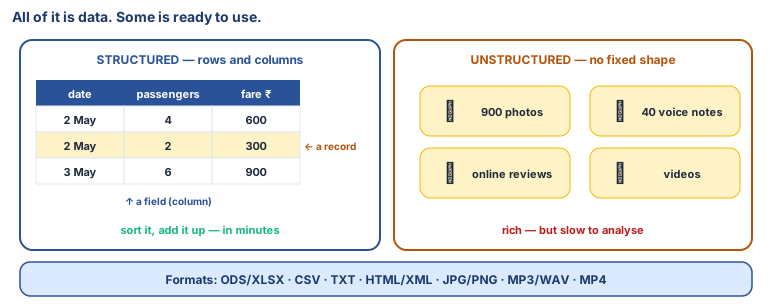
- Structured data sits in rows and columns — easy to store, search, sort and analyse.
- Unstructured data images, video, audio, posts — has no fixed shape. Richer, but harder to analyse.
- A row is a record (one complete entry). A column is a field (one piece of information).
- Formats: databases · text (TXT, CSV) · spreadsheets · web (HTML, XML) · media (JPG, PNG, MP4, MP3, WAV).
- The format decides how easily data can be read, analysed and shared.
Debate it
Many old Kashmiri manuscripts and newspapers exist only as scanned images. A student wants to find every page that mentions "saffron". Why is that hard, and what would make it easier?
Check yourself — practice, not a test
1. Which of these is structured data?
- ○ A video of the school function
- ○ The school attendance register
- ○ Voice notes from parents
- ○ Photos of the science fair
2. Match each file to its format family:
rainfall.csv · marks.ods · index.html · azaan-recording.mp3
Match with: Media file · Spreadsheet · Web / mark-up file · Text file3. In a database table, one complete row is called a ______.
4. Unstructured data is useless for AI. (it is rich, but harder to analyse)
- ○ True
- ○ False
5. Which are unstructured data? (Choose all.)
- ○ Social media posts
- ○ A bus timetable
- ○ Audio recordings
- ○ Emails
Remember
Structured data sits in rows and columns. Unstructured data does not, and it is harder for a computer to use.