Class 8 · Unit 0: Refresher · Lesson 0.1 · 40 min
Back at the laptop
Bilal wants to train a model that tells you what's in his bag. Hiba asks one question: who needs that?
Today you will: Set up your Class 8 folder · List three real problems you can see · Set a typing goal against your own score
Story
First day back. Bilal is already at the laptop, opening Teachable Machine.
Bilal: “I'm going to train a model. Photos of everything in my bag.”
Hiba pulls up a chair. "A model that does what?"
Bilal stops. "…Tells you what's in my bag."
Hiba: “And who needs that?”
He hasn't got an answer. Hiba grins. "That's the whole of Class 8, I think. Last year we learned how AI predicts. This year we build things with it — and the hard part isn't the training. It's knowing what problem you are solving, and for whom."
Watch
Back at the laptop — — scan code 8.0.1 in the printed book.
Warm up your fingers
Skill: accuracy at speed, hands off the keys.
- On typing.com, open the review lesson your teacher sets for the first week.
- Sit straight, wrists off the desk, eyes on the screen and not on your hands.
- Accuracy first. A word typed wrong has to be typed twice.
- Class 8 Term 1 target, to reach by May: 28–32 WPM at 93% accuracy or better. Today is only a starting line.
On the laptop
You need: File Manager · LibreOffice Calc · typing.com
Mission 1: Your mission
- ☐1
In the
Class-8folder, openmy-workand make a folder named with your roll number only, e.g.08-roll-12. - ☐2
In Calc, headings: Problem · Who has it · How I would know it was fixed.
- ☐3
Predict: which of your problems will be easiest to prove fixed? Then fill three real problems you've seen in your school, street or village — not world problems.
- ☐4
Save as
problems.ods. Keep it — one may become your year project. - ☐5
Log in to typing.com with your new card. Take the one-minute test and write your WPM, accuracy and goal — against your own last score. Log out and shut down.
No laptop today?
Write the three problems in your notebook. With a partner, pick one: who has it, and how would you know it was fixed? Do the warm-up on the paper keyboard from your Class 6 book.
Now you know
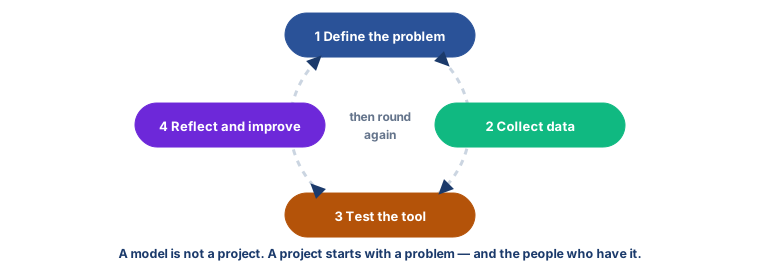
- A model is not a project. A project starts with a problem and the people who have it.
- Four stages, all year: define the problem → collect data → test the tool → reflect and improve. Then round again.
- One folder each, clear file names, no personal details in the names.
- Your goal is your own, set a little above your last score. Log out on a shared laptop.
Debate it
Bilal's model would have worked perfectly. It would have sorted the things in his bag with high accuracy, and it would have been useless.
Can something be technically excellent and still worth nothing? Name one thing you have seen — an app, a machine, a form — that works exactly as designed and helps nobody.
Check yourself — practice, not a test
1. What is the first stage of the AI project cycle?
- ○ Train the model on as much data as you can find
- ○ Define the problem, and who has it
- ○ Test the tool
- ○ Present the results
2. Put the four stages of the project cycle in order:
- 1. Define the problem
- 2. Test the AI tool
- 3. Collect data
- 4. Reflect and improve
3. Your Class 7 typing.com login carries on into Class 8. (accounts are made fresh each session, so you get a new card)
- ○ True
- ○ False
4. A good typing goal is measured against your own ______ score.
5. Which folder name follows our privacy rule?
- ○ bilal-dar-8A
- ○ 08-roll-07
- ○ bilal-near-the-masjid
- ○ bilal-abba-phone
Remember
Find the problem first. The model comes last.