Class 8 · Unit 1: The AI project lifecycle · Lesson 1.3 · 40 min
Training the model
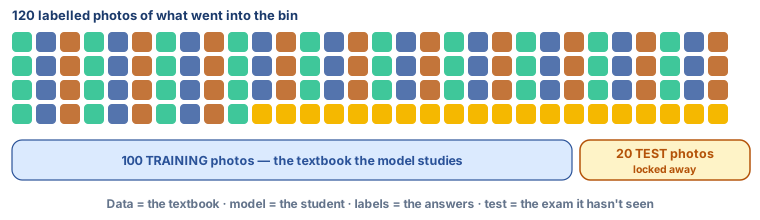
120 photos, all labelled. “Train it on all of them,” says Bilal. “Then how will we ever know if it works?” says Hiba.
Today you will: Train a three-class model · Read its confidence scores · Keep a test set locked away
Story
The photos are in. Following the rules the class agreed, the AI club spent a week photographing what went into the bin behind the science block: the item on a sheet of paper, never a person. One hundred and twenty photos, each one labelled wet, dry or hazardous as it was taken.
Bilal drags the whole folder into Teachable Machine. "Right. Train it on all of them."
Hiba: “All of them? Then how will we know if it works?”
Bilal: “We'll show it a photo.”
Hiba: “Which photo? They're all in there. It has already seen every one. It never sees these. Not today. Not until we're ready to find out the truth.” (She takes twenty photos out of the folder and puts them in a second folder marked test.)
Today you build the model. The rule Hiba just made — keep some examples back — is what makes tomorrow's answer honest.
Watch
How a model is trained — — scan code 8.1.3 in the printed book.
Warm up your fingers
Skill: capitals without looking — the shift key with both hands (6 min)
- On typing.com, open the Intermediate lessons covering capital letters and shift . Use the shift key on the opposite hand to the letter.
- Then type these class names three times, exactly as they are spelt:
Wet Waste · Dry Waste · Hazardous Waste - Term 1 goal: 28–32 words per minute at 93% accuracy.
On the laptop
You need: Teachable Machine (no account) · LibreOffice Calc · waste/train/ (about 30 photos per class) · waste/test/ (20 photos — not opened today)
Mission 1: Three classes (8 min, in pairs)
- ☐1
teachablemachine.withgoogle.com → Image Project → Standard. Don't sign in.
- ☐2
Name the classes Wet, Dry, Hazardous, and upload the matching
waste/train/photos. - ☐3
How many examples does each class have? Note it — you'll need it in Unit 4.
Mission 2: Train and watch (10 min)
- ☐4
Train Model — it trains on this laptop.
- ☐5
Predict: which item from the classroom bin will it be least sure about? Hold up items to the webcam, or upload spare photos.
- ☐6
In Calc, record five items: what it was · what the model said · its top confidence. Note one above 90% and one where the top two were close.
Mission 3: Leave the test folder alone (2 min)
- ☐7
Keep the tab open or export the model for Lesson 1.4.
No laptop today?
Play the student and the textbook: the class sorts twenty picture cards into wet, dry and hazardous; a volunteer studies them for two minutes, then sorts five new cards. Ask what rule they used — that sentence is the model.
Now you know
- Stage 3 is training. The model is the part that decides.
- Training data is labelled every example carries its answer.
- Nobody writes the rule. The model finds the pattern — that's what makes it AI.
- A confidence score says how sure it is. High is not proof.
- Better examples beat a better tool, nearly every time.
- Hold back a test set before training or you'll only test its memory.
Debate it
Another group trains its model on photos taken in bright sunlight, each item placed on a clean white sheet, all photographed on the same afternoon.
- What will happen when the model is shown a wrapper lying in the shade of the bin, at dusk?
- What does that tell you about where training photos should be taken?
- The group's model scores very well in the classroom. Is it a good model? What would you need to know before answering?
Check yourself — practice, not a test
1. In an AI project, the model is:
- ○ The laptop the project runs on
- ○ The part that learns the pattern and makes the decision
- ○ The folder of photographs
- ○ The person who labels the data
2. In machine learning, a programmer writes the rule the model follows.
- ○ True
- ○ False
3. Data that carries the correct answer with each example is called ______ data.
4. Why must some examples be kept out of training?
- ○ To save space on the laptop
- ○ To make training faster
- ○ So the model can later be tested on examples it has never seen
- ○ Because the tool only accepts 30 photos
5. Match each part of the analogy to what it stands for:
The textbook · The student · The answers at the back
Match with: The training data · The labels · The model
Remember
The model is learned from examples, not written as rules. Keep some examples back.