Class 8 · Unit 2: Building with no-code AI · Lesson 2.3 · 40 min
Building a classifier that works
Hiba holds a leaf up to the window. “Hazardous, 96%.” Twenty-eight photos, one desk, four minutes — the model learned the desk.
Today you will: Plan classes that don't overlap · Vary your photos on purpose · Test in a different place and light
Story
In Unit 1, Bilal's group trained a model in four minutes and it scored beautifully.
Then Hiba held up a leaf in front of the window, with the light behind it, and the model said hazardous with 96% confidence.
Bilal: “Ninety-six per cent! How can it be so sure and so wrong?”
Their teacher looks at the training photos: twenty-eight of them, all taken on the same desk, in the same light, at the same distance, within four minutes.
Teacher: “Your model didn't learn what a leaf is. It learned what your desk looks like.”
Today you build one properly. It takes longer, and it works.
Watch
What makes a good training set — — scan code 8.2.3 in the printed book.
Warm up your fingers
Skill: typing without looking, Term 1 (5 min)
- On typing.com, continue this term's lessons. Cover your hands with a sheet of paper if you find yourself looking down.
- Type your class plan headings for practice:
Class name, how many examples, where photographed, light, background - Target: 28–32 WPM at 93%+.
On the laptop
You need: Teachable Machine (no account) · classifier-plan.ods · a webcam
Mission 1: Plan before you photograph (5 min, in groups of 3)
- ☐1
Choose three classes you can photograph here — pen / pencil / eraser, chinar leaf / willow leaf / paper, wet / dry / hazardous.
- ☐2
Could one item belong to two classes? Change your classes now. Where will the model be used? Photograph it there.
- ☐3
Plan 30 examples per class: at least 3 objects, 3 backgrounds, 2 kinds of light. Choose 5 test items per class to set aside.
Mission 2: Build it (15 min)
- ☐4
Four classes: your three, plus
Background(empty desk, a hand, the wall). - ☐5
Webcam → Hold to Record. Keep moving: turn it, bring it closer, change the background and the light. Photograph the test items separately.
- ☐6
Train Model, then test the 15 held-back items and record each result.
- ☐7
Predict: will it survive in a different part of the room? Try it.
⚠️ Objects only. No photographs of people.
No laptop today?
Design it on paper: three classes that don't overlap, 30 examples each, how you'd vary them, and which items you'd hold back. Then swap plans and try to break each other's: "All your photos are on a desk — what happens outdoors?"
Now you know
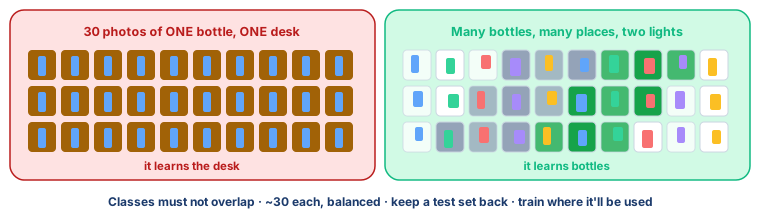
- Classes must not overlap. If an item can honestly belong to two, fix the classes, not the model.
- About 30 examples per class, balanced.
- Variety beats quantity. Ten bottles in three places teach more than thirty photos of one.
- Hold the test set back before training, and train it where it will be used.
- Confidence is not correctness.
- A no-code platform like Teachable Machine trains a model without code. The real skill — good classes and honest examples — is yours.
Debate it
Your group's model works perfectly in the computer lab and fails in the school yard.
Nothing about the objects changed. What changed, and whose fault is the failure — the model's, or the people who chose its training photos?
Check yourself — practice, not a test
1. Which make a training set better? (choose all)
- ○ Photographs taken in different light
- ○ Several different objects in each class
- ○ Thirty photos of the same object from the same spot
- ○ About the same number of examples in each class
2. Testing a model on the same photos it trained on tells you how well it will work on new ones.
- ○ True
- ○ False
3. Adding a ______ class of empty desks and walls stops the model forcing every picture into a real class.
4. A model says hazardous with 96% confidence and is wrong. This shows that:
- ○ The model is broken and must be deleted
- ○ Confidence measures preference, not correctness
- ○ 96% is too low to trust
- ○ The test photo was invalid
5. A tool that trains a model from your examples without you writing any code is called a ______ platform.
6. Put the build in the right order:
- 1. Choose classes that do not overlap
- 2. Train the model
- 3. Photograph varied training examples
- 4. Test on the held-back items
- 5. Decide which items will be held back for testing
Remember
A model learns what your photos have in common. Make sure that is the thing you meant.