Class 8 · Year project
An AI for our community
Choose a problem you can see. Photograph it, train a model, test it on photos it has never seen — then stand up and say exactly where it fails.
The big idea
All year you have run the project cycle on problems we chose for you. Now you run it on a problem you choose, from start to finish:
Define the problem → collect data → test the tool → reflect and improve.
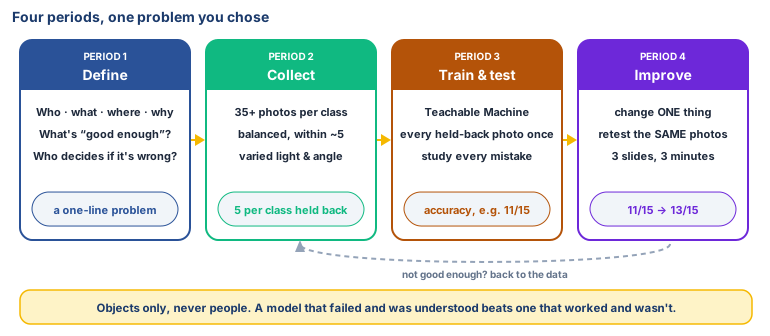
You will build something that works. You will also find out exactly where it fails — and that second part is the real work. Anybody can show a model its own training photos and get a good score. An engineer shows it photographs it has never seen, counts the mistakes, and says out loud what the thing cannot yet do.
🕌 From our heritage
You met maṣlaḥah in Class 6 — acting in the interest of people, especially those most easily left out. This project is that idea with a laptop attached: the question is never "can I train a model?" but "who is this for, and does it work for them?" See Class 6 Unit 4 Lesson 5; al-Ghazālī, al-Mustaṣfā; al-Shāṭibī, al-Muwāfaqāt.
📱 Scan to watch: Building an AI for your community —
The golden rule: things, not people
Your dataset is photographs. Every photograph is of an object, never a person.
| ✅ Allowed | ❌ Not allowed |
|---|---|
| Waste items on a sheet of newspaper | Anyone holding the waste, or any hands in the frame |
| Leaves, fruit, tools, packets, books | Faces, uniforms with a name, a classmate "just in the background" |
| The school yard, a bin, a wall | The inside of someone's home, a shop counter with people at it |
| Your own group's objects | Anything from someone's property without asking them first |
Consent checklist — tick every line before you photograph anything:
- No people in the frame, including yourself. Not even a hand.
- Nothing that identifies a family, a shop or a house (name boards, number plates, letters).
- If the thing belongs to someone else — an orchard, a shop, a neighbour's bin — you asked them, and they said yes.
- File names describe the object and a number (
wet-04.jpg), never a person. - Photographs stay in your group's folder on the school laptop. You do not post them anywhere.
- If you are unsure about a photograph, you ask your teacher before taking it, not after.
Period 1: Define the problem
-
Get into groups of 3–4. Open
problems.odsfrom your own folder — the three problems you listed in the refresher lesson — and put the group's twelve problems side by side. -
Choose one problem that an image classifier could genuinely help with, or take one of the three ready-made tracks below. Ask: is the difference between the classes something a camera can actually see? "Is this bin full?" — yes. "Is this family poor?" — no, and never.
-
Fill in the 4Ws canvas in a new Calc file,
project-canvas.ods: -
Write one sentence underneath, in this shape: "[Who] need a way to [do what], because [why]."
-
Now write the part most projects skip. In the same file:
- What would count as good enough? ("Right about 4 times out of 5" is an answer. "Perfect" is not.)
- What happens if it is wrong? A sorter that misfiles a tea bag wastes nothing. Think about what your mistake costs.
- Who decides? Where does a person stay in charge of the final decision? (Class 7 Unit 5: human in the loop.)
-
Plan your classes and your data. Write down: how many classes (2 or 3 — not more), what each one is called, and where you will get at least 35 photographs of each.
Keyboard warm-up: type the problem statement and the canvas straight onto the laptop, without looking at your hands. You will be typing the report in Period 4, so this is practice.
Who
- Your answer:
What
- Your answer:
Where
- Your answer:
Why
- Your answer:
Period 2: Collect and balance the data
- Take your photographs. At least 35 per class, and follow the consent checklist above.
- Balance them. If you have 60 photos of dry waste and 12 of wet waste, your model will learn that "everything is dry". Count what you have in Calc, and keep the numbers close — within about 5 of each other.
- Vary them. Take photographs in different light (window, corner, cloudy day), at different angles, close and far, on different backgrounds. A model trained on 35 photos of the same bottle in the same spot has learned that spot, not the bottle.
- Split them before you train, exactly as you did in Class 7:
- Put 5 photographs of each class into a folder called
test. Nobody trains on these. - Everything else goes into
train. - The test photographs are the exam paper. If the model sees them now, the exam is worthless.
- Put 5 photographs of each class into a folder called
- Record your dataset in
project-canvas.odson a second sheet: class names, how many training photos, how many test photos, where they were taken, and who is missing or under-represented.
Period 3: Train, then test honestly
-
Open Teachable Machine in the browser (no account needed) and start a new Image Project.
-
Make one class per category. Name them properly —
wet,dry,hazardous— notClass 1. -
Upload only the
trainphotographs. Train the model. Watch it finish. -
Now the real test. One at a time, show it each of your held-back test photographs and fill in a results table in Calc:
Photo What it really is What the model said Right? wet-31.jpgwet wet ✔ dry-33.jpgdry hazardous ✘ -
Work out the accuracy:
=COUNTIF(D2:D16;"✔")/COUNT…— or simply, how many it got right, divided by how many you tested, written as a percentage. -
Look at every mistake, one by one. This is the most important twenty minutes of the project. Write down:
- Which class is it getting wrong most?
- What do the wrong ones have in common — the light, the background, the angle, the size of the thing?
- Is there a pair it keeps confusing (calling wet "dry", but never dry "wet")?
-
Export your model into the
models/folder so you do not lose it.
Period 4: Reflect, improve, and present
- Change one thing. One only, or you will not know what helped. For example:
- add 15 more photographs of the class it fails on, in the light it fails in
- remove the photographs that are nearly identical
- merge two classes it cannot tell apart, and say why you merged them
- Retrain, and test on the same held-back photographs as before. Different photographs would make the comparison meaningless.
- Record both scores: "Before: 11 out of 15. After: 13 out of 15."
- Make three slides in LibreOffice Impress:
- Slide 1 — the problem. Your one-sentence problem statement, and who has the problem.
- Slide 2 — what we built. Your classes, how many photographs, your accuracy before and after, and the one thing you changed.
- Slide 3 — what it still gets wrong, and who should be careful. At least one honest failure, with the reason. One sentence: "A person should still check when ___."
- Present for 3 minutes. Everyone speaks. The class asks each group one question, and the best question to ask is always "what did it get wrong?"
A model that failed and was understood beats a model that worked and wasn't. Groups that report 100% accuracy will be asked how many test photographs they held back, and whether the model had seen them before.
No laptop today?
Run the whole cycle on paper, with printed or drawn cards.
- Define the problem and the 4Ws canvas in your notebooks.
- Collect: 20 picture cards per class, drawn or cut from newspapers. Hold back 5 per class.
- Train: one person is the model. They study only the training cards and write down the rule they are using ("shiny and thin = dry").
- Test: show them the held-back cards, face on, one at a time. Record right and wrong, and work out the accuracy.
- Improve: the group may change one line of the rule, then retest on the same cards.
- Present the poster. The rubric is exactly the same.
Three ready-made tracks
Take one of these if your group cannot settle on a problem. Every track has a real local use and needs no photographs of people.
Track A: The waste sorter
Classes: wet (food, peels, tea leaves) · dry (paper, plastic, metal, glass) ·
hazardous (batteries, medicine strips, broken bulbs — photograph only, handled by the teacher).
Why it matters: Srinagar sends roughly 550 tonnes of waste a day to the Achan site, where over 11 lakh tonnes of old waste has piled up. Mixed waste is the reason so little can be composted or recycled: when segregated waste gets tipped into the same truck, the sorting was wasted. (Sources at the foot of this page.)
Watch for: hazardous items are rare, so groups end up with too few. Photograph the same few items many times in different places rather than handling more of them.
Track B: The leaf doctor
Classes: healthy · spotted (fungal marks such as apple scab), and optionally chewed
(insect damage).
Why it matters: apple scab spreads in a wet spring, and spotting it early decides whether a crop is worth spraying. You met this in Class 7 Unit 3, and SKUAST-K's AI centre is working on exactly this problem with better data than you will have.
Watch for: photograph leaves against a plain background, both sides, in real orchard light. A model trained on leaves on white paper fails on leaves on a tree.
Track C: The apple grader
Classes: ready · not ready · damaged (bruised, cut, insect-marked).
Why it matters: grading is done by eye and by hand, and a mistake costs a grower money. In Class 7 you graded apples with a spreadsheet rule using weight and colour. Now try it the other way, with pictures and no rule at all, and compare which is easier to get right.
Watch for: "damaged" needs to include small damage, not only obvious bruises, or the model learns to spot big dark patches and nothing else.
Your own idea is welcome, and usually better. It needs your teacher's approval, two or three classes a camera can actually tell apart, and no people in any photograph.
Rubric (for teacher and self-assessment)
Each group is described against the skill. Groups are never compared with each other, there is no ranking and no "best project", and a low accuracy score does not mean low marks.
Who
- Your answer:
What
- Your answer:
Where
- Your answer:
Why
- Your answer:
My reflection sheet (each student fills this in alone; it is private to them and the teacher)
- Our problem was: ______________________
- The people who have this problem are: ______________________
- My job in the group was: ______________________
- We held back ___ photographs per class. We did that because: ______________________
- Our accuracy before the change was ___ , and after the change it was ___ .
- The one thing we changed was: ______________________
- The mistake our model made most often was: ______________________
- I think it made that mistake because: ______________________
- Something our dataset did not include that it should have: ______________________
- If a school or a shop actually used our model tomorrow, what should a person still check by hand? ______________________
- One thing I can do now that I could not do in March: ______________________