Class 9 · Unit 0: Refresher · Lesson 0.1 · 40 min
Back at the laptop
Bilal leaves out one bracket and the screen fills with red. It isn't broken. It did exactly what he wrote.
Today you will: Run your first line of Python · Read an error message calmly · List three problems — and the data that proves them
Story
First day back. Bilal has the laptop open before Hiba has sat down.
Hiba: “Watch this.” (He types one line, presses the green button, and the word Assalamu alaikum appears at the bottom of the screen.)
Hiba: “It understood you.” (straight-faced.)
Bilal: “Obviously it understood me.”
Hiba: “Did it? Type it again, but leave out one bracket.”
He does. The screen fills with red text.
Bilal stares at it. "It's broken."
Bilal: “It isn't broken. It did exactly what you wrote. That's the whole difference this year. Last year we trained machines. This year we tell them, and a machine does what you wrote — not what you meant.” (Hiba pulls the laptop over.)
Watch
Back at the laptop — — scan code 9.0.1 in the printed book.
Warm up your fingers
Skill: the symbols code is made of — ( ) : " = _ [ ]
- On typing.com, open the symbols lessons your teacher sets for the first week.
- These eight characters will appear in every program you write this year. Most of them need Shift, so use the Shift key on the opposite hand to the symbol.
- Accuracy before speed, always. In a sentence, a wrong bracket is a typo. In a program, it is the difference between working and not working.
- Class 9 Term 1 target, to reach by May: 32–38 WPM at 94% accuracy or better. Today is only a starting line.
On the laptop
You need: File Manager · Thonny · LibreOffice Calc · typing.com
Mission 1: Your folder (2 min)
- ☐1
In the
Class-9folder, openmy-workand make a folder named with your roll number only, e.g.09-roll-12.
Mission 2: Your first program (9 min)
- ☐2
Open Thonny: the editor on top, where programs are written; the shell below, where they run.
- ☐3
Type exactly — every bracket, every quote:
print("Assalamu alaikum") - ☐4
Save it as
hello.pyin your folder and press Run (the green arrow). - ☐5
Predict: what will happen if you delete the last bracket? Write it down. Then do it and Run.
- ☐6
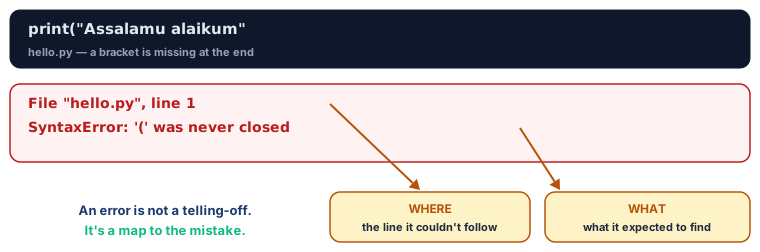
Read the red message. Find the line number it names. Put the bracket back and Run again.
Mission 3: Three problems (5 min)
- ☐7
In Calc, headings: Problem · Who has it · What data would show it is real.
- ☐8
Fill three problems you've seen in your school, street or village. The third column is the hard one: not "everyone knows" but "hours the tap ran, written down daily for a month".
- ☐9
Save as
problems.ods. Keep it — one line may become your year project.
Mission 4: Typing baseline (5 min)
- ☐10
Log in to typing.com with your new card. Take the one-minute test; write your WPM, accuracy and Term 1 goal on the card. Log out and shut down properly.
No laptop today?
Write the one-line program on paper, then write it again with one mistake and ask a partner to find it. Fill the three-problems table in your notebook and do the typing test next lab period.
Now you know
- A program is instructions a machine follows exactly. It does what you wrote, not what you meant — which is why the same skill that finds a missing bracket also finds a wrong rule.
- An error message is information, not a scolding. It names the line it could not follow. Read it; do not clear it and start again.
- Thonny has two halves: the editor, where a program is written and saved, and the shell, where it runs.
- Typing accuracy now costs more than typing speed.
print("x"andprint("x")are one character apart, and one of them does nothing at all. - A problem is only workable when you can say what data would show it is real. That sentence is the whole of Unit 1.
Debate it
Bilal said the computer "understood" him.
Did it? It produced exactly the greeting he asked for — and then produced nothing at all when one bracket was missing. A person reading the same line with a bracket missing would have understood it perfectly.
So what is the machine actually doing, if it is not understanding? And why does the answer matter before you ask a machine to make a decision about somebody?
Check yourself — practice, not a test
1. Your program will not run and red text appears. The first thing to do is:
- ○ Delete the program and start again
- ○ Call the teacher before reading anything
- ○ Read the message and find the line number it names
- ○ Restart the laptop
2. Thonny needs an internet connection to run a Python program. (Python is installed with Thonny and runs on the laptop itself)
- ○ True
- ○ False
3. A program does what you ______, not what you meant.
4. Which folder name follows our privacy rule?
- ○ hiba-9B-nowgam
- ○ 09-roll-04
- ○ hiba-dar-abba-phone
- ○ hiba9
5. Which of these is a usable answer in the column "What data would show it is real"?
- ○ Everyone says the bus is always late
- ○ The arrival time of the 8 a.m. bus, written down every school day for a month
- ○ The bus is a big problem for students
- ○ Somebody should fix the buses
Remember
The computer does what you wrote, not what you meant.