Class 9 · Unit 5: Python · Lesson 5.1 · 40 min
Your first program
No blocks. An empty white page. For the first time, the computer asks what you want instead of offering a list.
Today you will: Make Python print and ask · Predict what a program will do, then run it · Read two error messages calmly
Story
Bilal opens Thonny for the first time, and waits.
Nothing happens. There is a white page at the top, a white box at the bottom, and no blocks anywhere. In Class 6 he had dragged move 10 steps out of a drawer. In Class 7 he had snapped if touching colour into place. The blocks were always there, waiting to be used, and you could not spell one wrong.
Bilal: “Where are the blocks?”
Hiba is already typing. "There are no blocks. You write them now."
Bilal looks at the empty page. It is the first time a computer has asked him what he wants, instead of offering him a list.
Watch
Your first Python program — — scan code 9.5.1 in the printed book.
Warm up your fingers
Today's symbols are the round brackets ( ) and the double quote ".
Every Python line you write this year will use them.
(is Shift + 9.)is Shift + 0."is Shift + ' — the key beside Enter.- typing.com: the punctuation and symbols lessons.
- Then type this line five times, with no mistakes, in the typing box or your notebook:
print("Salaam")
Speed does not matter today. A bracket in the wrong place is a program that will not run, so accuracy is the whole exercise.
On the laptop
You need: Thonny (offline, no account)
Mission 1: Make it say something (8 min)
- ☐1
In the editor (top), type exactly:
print("Salaam!"). Save it as01-greeting.py. - ☐2
Predict: will the quotes show on screen? Then press F5. The output appears in the shell (bottom).
- ☐3
Add two lines, so it greets in three languages. Predict how many lines of output, then run:
print("Salaam!")
print("Assalamu alaikum!")
print("Hello!")
Mission 2: Make it ask something (6 min)
- ☐4
Add these, run, and type your name when it waits:
name = input("What is your name? ") print("Salaam,", name) - ☐5
Run it twice with different names. The program doesn't change; the output does.
Mission 3: Break it on purpose (5 min)
- ☐6
Delete the last
"in line 1. Predict: print, nothing, or refuse? Run it:SyntaxError: unterminated string literal— you opened a quote and never closed it. - ☐7
Put it back, delete the closing
)instead, and run:SyntaxError: '(' was never closed. Fix it and save — your first program to keep.
Stuck?
F5 does nothing? Thonny saves before running — give the file a name. Red text you can't
read? Read only the last line. print not coloured? Check the spelling: Print isn't
print.
Finished early?
Ask for the person's village too, and print a two-line greeting using both answers.
No laptop today?
Do a dry run in your notebook: copy a four-line program with one input, and write what
appears on screen line by line, assuming the person types Hiba. Mark where it stops and
waits.
Now you know
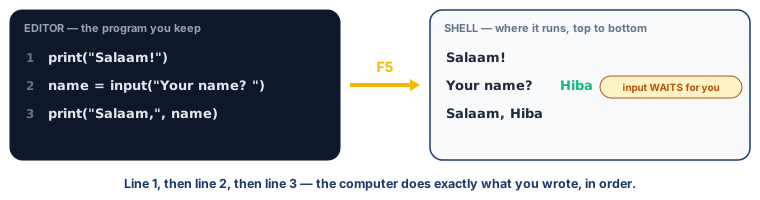
- Python is written, not dragged. Every symbol matters, including brackets and quotes.
print(...)puts something on the screen.input(...)asks a question and waits.- Text inside quotes is printed exactly as you typed it. A name without quotes is a variable — a box holding whatever the user typed.
- A program runs top to bottom, one line at a time.
- A SyntaxError means Python could not understand the line — usually a missing bracket or quote. It names the line. It is information, not a judgement.
- Save with .py . That is what makes the file a program.
Debate it
Thonny tells you unterminated string literal instead of "something is wrong".
Which is more useful to a beginner, and why? Now think of a person, not a program: when you correct a classmate's mistake, are you telling them where it went wrong, or only that it did?
Check yourself — practice, not a test
1. What does input() do that print() does not?
- ○ It runs faster
- ○ It stops and waits for the person at the keyboard
- ○ It saves the file
- ○ It writes in colour
2. A Python file must be saved with the ending ______ .
3. What does this print? python print("Salaam") print("Kashmir")
- ○ Salaam Kashmir on one line
- ○ Salaam on one line, then Kashmir on the next
- ○ SalaamKashmir
- ○ Nothing, it is wrong
4. Find the bug. This line will not run: print("Good morning)
- ○ print should be Print
- ○ The closing " is missing
- ○ It needs a full stop at the end
- ○ Brackets are not allowed
5. An error message means you should stop and ask the teacher before trying anything yourself.
- ○ True
- ○ False
6. Put these lines in the order they must appear, so the program asks before it greets:
- 1. name = input("What is your name? ")
- 2. print("Salaam,", name)
- 3. print("Welcome to Class 9")
Remember
Type it exactly. Run it. Read the last line of the error. Fix one thing.