Class 9 · Unit 5: Python · Lesson 5.5 · 40 min
Lists, and doing something to every item
Five days, five variables. Then the teacher asks for a month: thirty-one variables. There's a better box.
Today you will: Store many values in one list · Do something to every item with a loop · Build a running total and a mean
Story
Hiba has five temperatures on the board — Monday to Friday — and a program with five variables in it: mon, tue, wed, thu, fri. It works. She is pleased with it.
Then her teacher asks for the average across a month.
Thirty-one variables. Thirty-one lines of typing, and thirty more + signs. She has written the same instruction over and over, which is exactly what a computer is supposed to do for her.
There is a better container, and a way to say do this to every item in it.
Watch
One name, many values — — scan code 9.5.5 in the printed book.
Warm up your fingers
Today's symbols are the square brackets [ ] and the comma ,.
[and]are to the right of P. No Shift — that is what makes them different from{and}.- typing.com: the symbols lessons, then a free practice round.
- Then type this line four times, with no mistakes:
temps = [12, 15, 18, 21, 19]
You have now met every symbol this unit needs: ( ) " " _ = : [ ] and the
operators. From here the difficulty is thinking, not typing.
On the laptop
You need: Thonny · save as 05-average.py
Mission 1: A list and its positions (6 min)
- ☐1
Predict the four outputs first, then run:
temps = [12, 15, 18, 21, 19] print(temps) print(temps[0]) print(temps[4]) print(len(temps)) - ☐2
Predict: what will
print(temps[5])do? Run it:IndexError: list index out of range. Positions start at 0. Delete the line.
Mission 2: Every item, in turn (8 min)
- ☐3
A running total, then the mean:
total = 0
for t in temps:
   total += t
print("Total:", total)
print("Average:", round(total / len(temps), 1))
total += tmeans addtto what's already intotal. You should get 85 and 17.0. - ☐4
Check it in one line:
print(sum(temps) / len(temps)).
Mission 3: Repeat until something changes (4 min)
- ☐5
A
whileloop runs as long as a condition is true:count = 5 while count > 0: print(count) count -= 1 print("Done")Forget
count -= 1and it runs for ever — press Stop. Every programmer does it once. Save: five programs kept.
Stuck?
IndexError? Count from zero. Total always 85? total = 0 must be above the loop. Won't
stop? A while with no -= 1 — press Stop. Only the last number prints? Check the
indentation.
Finished early?
Find the highest temperature without max(): start with highest = temps[0], loop, and
replace it whenever you meet a bigger one. Check against max(temps).
No laptop today?
Trace the running total on paper in two columns, t and total, one row per time round. How
many rows, and why? What would print for a one-item list, [12]?
Now you know
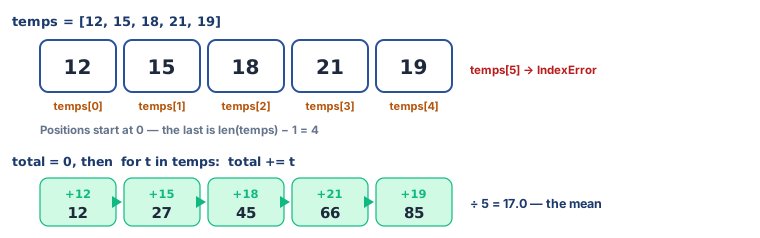
- A list holds many values under one name:
temps = [12, 15, 18, 21, 19]. - Positions start at 0. The last item is at
len(list) - 1, and asking beyond it gives an IndexError. for item in list:does the same thing to every item, in order.+=adds to what a variable already holds;-=takes away. They are shorthand forx = x + 1andx = x - 1.- A running total needs a pot set to 0 before the loop.
while condition:repeats as long as the condition is true — and repeats for ever if nothing inside ever makes it false.- Every model you trained this year learned from a list of examples. This is the shape data has.
Debate it
To find the average, the program needed all five numbers, not one.
A model that grades apples needs many photographs; a model that predicts rainfall needs many years. But somebody chooses which five days, or which five hundred photographs, go into the list. Who is left out of a list, and what does that do to the average? You have answered a version of this question every year since Class 6 — say what has changed in your answer.
Check yourself — practice, not a test
1. In temps = [12, 15, 18, 21, 19], what does temps[1] give?
- ○ 12
- ○ 15
- ○ 1
- ○ 19
2. What does this print? python nums = [4, 6, 10] total = 0 for n in nums: total += n print(total)
- ○ 0
- ○ 20
- ○ 10
- ○ 4 6 10
3. Find the bug. This should print the total, but prints 10: python nums = [4, 6, 10] for n in nums: total = 0 total += n print(total)
- ○ The list is wrong
- ○ total = 0 is inside the loop, so it resets each time
- ○ += should be =
- ○ print should be indented
4. len([3, 5, 7]) gives 2, because counting starts at zero.
- ○ True
- ○ False
5. A loop that never ends because its condition stays true is called an ______ loop.
6. Put these in the order they must appear to total a list correctly:
- 1. for n in nums:
- 2. total = 0
- 3. print(total)
- 4. total += n
Remember
A list holds many; a loop visits each one. Count from zero, and set the pot to 0 first.