Class 10 · Unit 4: Computer vision · Lesson 4.2 · 40 min
Images are numbers
This sheet is 144 numbers. Colour them in and a picture appears. That's all a photo ever was.
Today you will: Turn numbers into a picture · Work out resolution and megapixels · Mix colours from red, green and blue
Story
Bilal emails Hiba a spreadsheet. No message, just a file: apple-pixels.csv.
She opens it. Twelve rows, twelve columns, all numbers. 235, 235, 70, 70, 150…
Hiba: “Is this a puzzle?” (she messages.)
Bilal: “It's a photo.”
Hiba: “It's a table of numbers.”
Bilal: “Colour them in.”
She selects all 144 cells and gives them a colour scale — dark for small, light for big. An apple appears, with a stem, a leaf and a shine on one side.
She stares at it for a long time. Then she types: "So every photo on my phone is just… this?"
Bilal: “Just bigger.”
Watch
How a computer sees a picture — — scan code 10.4.2 in the printed book.
Warm up your fingers
Skill: numbers and commas (5 min)
-
On typing.com: the numbers lessons.
-
Type three times, eyes on the screen:
235,235,70,70,150,150,70,70,235,235,235,235 -
Goal this term: 38–44 WPM at 95%.
On the laptop
You need: LibreOffice Calc · datasets/apple-pixels.csv · Thonny (Finished early)
Mission 1: Numbers into a picture (10 min, in pairs)
- ☐1
Open
apple-pixels.csv. Make every column narrow and every row the same height, so the cells are square. - ☐2
Predict: looking only at the numbers, where is the stem? Write the row and column.
- ☐3
Select all 144 cells → Format → Conditional → Color Scale. Set the lowest value to black and the highest to white. What appears?
- ☐4
Change one number from 70 to 235. What happened to the picture? Change it back.
Mission 2: Resolution (7 min)
- ☐5
In a new sheet: this image is 12 × 12. How many pixels?
- ☐6
A phone camera takes photos 4000 × 3000. How many pixels? How many megapixels?
- ☐7
In grayscale each pixel takes 1 byte. How many bytes is the phone's photo? And in RGB, with three bytes per pixel?
Mission 3: Three numbers make a colour (6 min)
- ☐8
Click any cell → Format Cells → Background → Pick a Color. Type R, G and B values to make: chinar red, saffron, Dal Lake blue. Write down the three numbers for each.
- ☐9
Predict the colour before you try: (255, 255, 0)? (0, 255, 255)? (128, 128, 128)?
Finished early?
In Thonny, open programs/pixels.py (save it next to apple-pixels.csv).
Predict what it prints, then run it. Change the symbols so the apple prints the other way round —
light where it was dark.
No laptop today?
Your teacher draws a 6 × 6 grid on the board with numbers. Everyone copies it on squared paper and shades each square — the darker the number, the darker the pencil. Then work out the megapixels of a 4000 × 3000 photo together.
Now you know
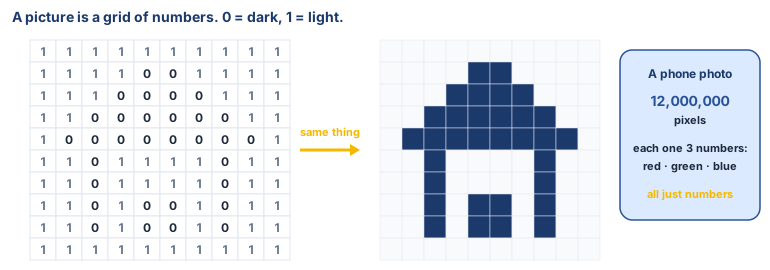
- A pixel is a picture element: the smallest unit of a digital image. Every photo is a grid of them.
- Resolution = width × height in pixels. 4000 × 3000 = 12 million = 12 megapixels.
- Grayscale: one number per pixel, 0 = black, 255 = white. One byte, 8 bits, 256 values.
- RGB: three numbers per pixel — red, green, blue, each 0–255. Three grids stacked.
- A machine never sees an apple. It sees numbers, and everything it "understands" is arithmetic on them.
Debate it
A photo of your face is, to a computer, a grid of numbers — and so is every photo on every phone in the valley.
- If a photo is only numbers, can a copy of it be told apart from the original? What does that mean for photos shared online?
- Why might this make a face a kind of data that needs protecting, like a phone number?
Check yourself — practice, not a test
1. In a grayscale image, what does a pixel value of 0 mean?
- ○ White
- ○ Black
- ○ Red
- ○ Transparent
2. A photo 4000 pixels wide and 3000 high has 12 ______ pixels.
3. A colour pixel in an RGB image is stored as three numbers.
- ○ True
- ○ False
4. Why do pixel values stop at 255?
- ○ 255 is the brightest colour there is
- ○ One byte (8 bits) can store 256 values: 0 to 255
- ○ Cameras can't measure more
- ○ It's a CBSE rule
5. Match each RGB value to its colour:
(255, 0, 0) · (0, 0, 0) · (255, 255, 255) · (255, 255, 0)
Match with: Yellow · Black · White · Red
Remember
A picture is a grid of numbers. Change the numbers, change the picture.