Class 10 · Unit 4: Computer vision · Lesson 4.3 · 40 min
A no-code image classifier
Your sorter is 100% right on the table. Move it to the floor and it falls apart. What did it really learn?
Today you will: Train a three-class smart sorter · Test it honestly on new photos · Catch a model learning the wrong thing
Story
Bilal's group builds a waste sorter for the school canteen: plastic, paper, food. They photograph everything on the white table in the lab, train it, and test it. Perfect. Every photo right.
On Monday they take it to the canteen. Gul Kaka drops a plastic bottle on the steel counter.
Paper, says the screen.
He tries a chapati. Plastic.
Bilal: “It worked on Friday.”
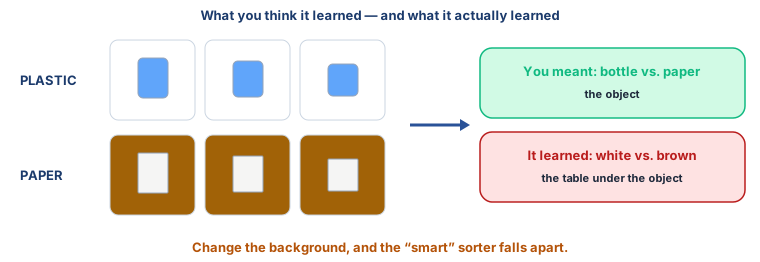
Hiba looks at their training photos. Every plastic bottle is on the white table. Every scrap of paper is on Bilal's brown notebook.
Hiba: “It didn't learn plastic. It learned the table.”
Watch
Build a sorter, then break it — — scan code 10.4.3 in the printed book.
Warm up your fingers
Skill: short labels, fast and exact (5 min)
-
On typing.com: the lesson your teacher sets.
-
Type three times, eyes on the screen:
classes = ["plastic", "paper", "food"] # three classes -
Goal this term: 38–44 WPM at 95%.
On the laptop
You need: Teachable Machine (online) · LibreOffice Calc · the photo sets in datasets/sorter/
Mission 1: Train it (10 min, in groups of 3–4)
- ☐1
Teachable Machine → Image Project → Standard. Make three classes:
plastic,paper,food. - ☐2
Upload the photos from
datasets/sorter/train/— about 15 per class. Look at them first: where was each class photographed? - ☐3
Press Train. Test it with one training photo from each class. It should be very sure.
Mission 2: Test it honestly (12 min)
- ☐4
Predict: on photos taken somewhere else, how many out of 9 will it get right? Write it down.
- ☐5
Test each photo in
datasets/sorter/test/— 9 photos, 3 per class, on a different background. Record actual and predicted for each in Calc. - ☐6
Build the 3 × 3 confusion matrix: actual down the side, predicted across the top. Count how many are right.
Mission 3: Fix it (6 min)
- ☐7
Add the photos in
datasets/sorter/mixed/to training — the same objects on floors, counters and hands. Retrain, and test the same 9 photos again. What changed?
Finished early?
Hold up something that is none of the three — your pencil box. What does the model say, and how sure is it? What should a sorter do with things it doesn't know?
No laptop today?
Your teacher shows the training photos and the test photos side by side on one screen. Pairs predict what the model will say for each test photo and why. Then look at the shortcut figure in Learn and find what every photo in each class has in common.
Now you know
- No-code vision tools Teachable Machine, Lobe, Orange — train an image classifier from labelled photos without code.
- A model learns whatever separates the classes in its training photos — the object, or the background, the lighting, the table.
- Learning a shortcut: perfect on training photos, useless anywhere else.
- Test on new photos, in new places. A confusion matrix shows exactly which classes it mixes up.
- Vary the training photos backgrounds, light, angles, hands — so the only thing the classes have in common is the object.
Debate it
Real companies have found their vision models learning shortcuts: skin-disease models that had learned what a ruler in the photo meant, because doctors photographed worrying moles with a ruler beside them.
- Why is a shortcut so hard to spot from the model's accuracy alone?
- What would you check before trusting a vision model trained somewhere far from Kashmir?
Check yourself — practice, not a test
1. A sorter is perfect on its training photos and poor on new ones. The most likely reason is:
- ○ The camera was too good
- ○ It learned something other than the object, like the background
- ○ It had too many classes
- ○ Teachable Machine is broken
2. Adding training photos with different backgrounds can help a model learn the object instead of the table.
- ○ True
- ○ False
3. A confusion matrix for three classes is a ______ × 3 table.
4. Which are no-code tools CBSE lists for computer vision? (choose all that apply)
- ○ Teachable Machine
- ○ Lobe
- ○ Orange Data Mining
- ○ Thonny
5. Put the steps in order:
- 1. Make a class for each category
- 2. Train the model
- 3. Add labelled photos to each class
- 4. Test it on photos it has never seen
Remember
A model learns what the pictures have in common — make sure it's the right thing.