Class 10 · Unit 4: Computer vision · Lesson 4.4 · 40 min
Features and the convolution operator
Nine numbers, slid across a picture, can find every edge in it. You'll do it by hand — then watch the apple light up.
Today you will: Say why corners are good features · Convolve an image by hand · Find the edges of the apple with a kernel
Story
Hiba's brother is doing a jigsaw of Nishat Bagh on the carpet: a thousand pieces, half of them sky.
Hiba: “The sky pieces are impossible. They all look the same.”
Bilal: “Do the edges of the terraces. Where the grass meets the wall.”
Hiba: “Better. But which bit of the wall? It's the same all the way along.”
Hiba picks up a piece with the corner of a fountain in it and puts it straight in its place.
Hiba: “Corners. A corner only fits in one spot.”
Watch
How a machine finds an edge — — scan code 10.4.4 in the printed book.
Warm up your fingers
Skill: a formula over a grid (5 min)
-
On typing.com: the symbols lessons.
-
Type three times, eyes on the screen:
=SUMPRODUCT($Image.A1:C3;$Kernel.$A$1:$C$3) -
Goal this term: 38–44 WPM at 95%.
On the laptop
You need: LibreOffice Calc · convolution.ods (sheets Door, Image, Kernel, Output)
Mission 1: By hand (10 min, in pairs)
- ☐1
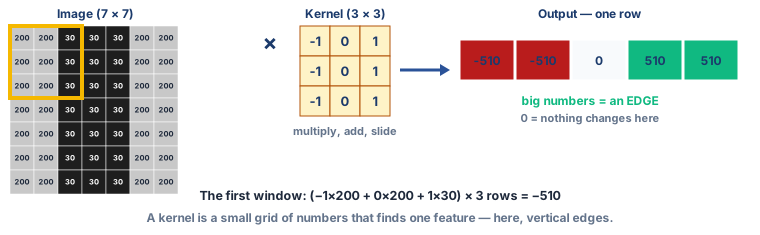
Sheet Door: a 7 × 7 image — a dark doorway (30) on a light wall (200).
- ☐2
Put the kernel over the top-left 3 × 3 corner of the image. Multiply each of the nine pairs, then add all nine. Write the answer.
- ☐3
Predict: as the kernel slides right across the top row, what five numbers will you get? Write them. Then work out all five.
Mission 2: Light up the apple (10 min)
- ☐4
Sheet Image holds the 12 × 12 apple from Lesson 4.2. Sheet Kernel holds the vertical-edge kernel.
- ☐5
In Output A1:
=SUMPRODUCT($Image.A1:C3;$Kernel.$A$1:$C$3). Fill it right to column J and down to row 10. Why does the output stop at 10 × 10? - ☐6
Predict: which parts of the apple will get big numbers? Then give Output a colour scale: red for the lowest, white for 0, green for the highest.
Mission 3: A different kernel (3 min)
- ☐7
Change the kernel to find horizontal edges: top row −1 −1 −1, middle 0 0 0, bottom +1 +1 +1. Predict first, then look. Which parts of the apple light up now?
Finished early?
Make a kernel that finds nothing at all — every output 0. Then one that makes the apple brighter. (Online, with your teacher: the "image kernels" page CBSE suggests lets you try kernels on a real photo.)
No laptop today?
Your teacher draws the doorway on the board as numbers. Pairs each get one 3 × 3 window, work it out, and write the answer on the board in its place. The row of answers appears. Then predict, as a class, what the horizontal kernel would find.
Now you know
- An image feature is information useful for the task — a point, an edge, an object.
- Corners are the best features, then edges. Flat areas look the same everywhere.
- Convolution: multiply the image and the kernel element by element, add it all up, slide one step, repeat.
- A kernel is a small grid of numbers. Each kernel finds one kind of feature — this one, vertical edges.
- Big numbers mean the feature is there. Zero means nothing changes. The output is a map of where the feature is.
Debate it
Photo apps use kernels to sharpen, blur and "beautify" faces in every photo.
- When a filter smooths skin and brightens eyes, is that computer vision or image processing? (Lesson 4.1)
- If most photos online have been filtered, what might a vision model trained on them learn about what faces look like?
Check yourself — practice, not a test
1. Which makes the best image feature?
- ○ A patch of clear sky
- ○ A stretch of straight wall
- ○ The corner of a window
- ○ A blank page
2. The small grid of numbers slid across an image in convolution is called a ______.
3. The kernel −1 0 +1 (in each row) sits on a patch that is all 200. The output is:
- ○ 200
- ○ 600
- ○ 0
- ○ −600
4. Without padding, convolving a 12 × 12 image with a 3 × 3 kernel gives a 10 × 10 output.
- ○ True
- ○ False
5. Put one step of convolution in order:
- 1. Slide the kernel one step and repeat
- 2. Place the kernel over a 3 × 3 patch of the image
- 3. Multiply each pair of numbers
- 4. Add all nine products
Remember
Multiply, add, slide. A kernel turns a picture into a map of one feature.